Solink Agentic AI summit
| Tuesday, June 23 |

Table of Contents

Table of Contents

If your security footage disappears when you need it, it’s not security. It’s a liability.

Businesses can’t afford to fumble video evidence. Whether it’s for an incident, insurance claim, or investigation, video is only valuable if it’s saved, managed, and shared the right way.

Here’s how to make sure you never lose it – and never waste time tracking it down.
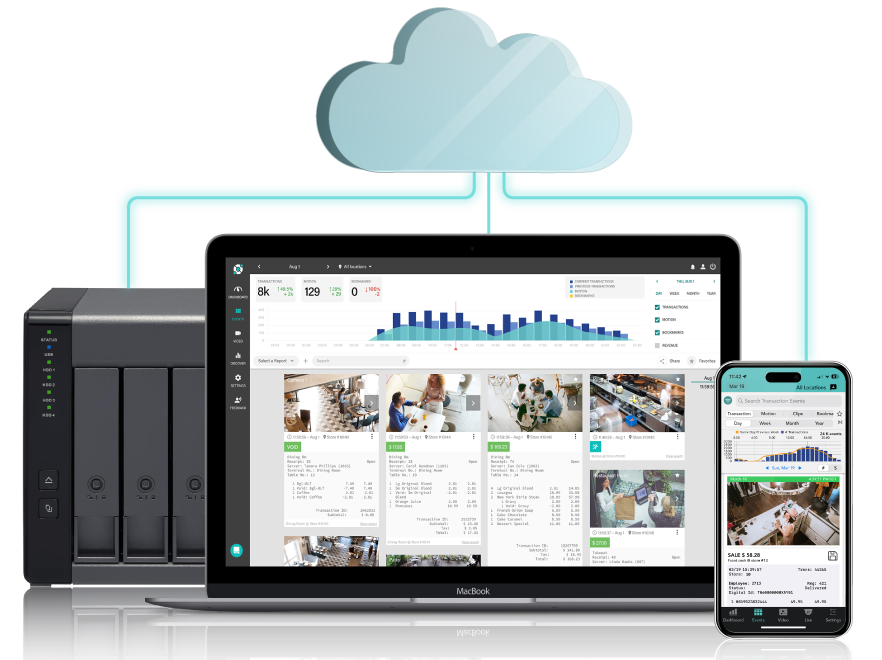
A network storage device, a laptop, and a smartphone display connected via cloud, with surveillance camera footage shown on the laptop and phone screens.

Stop babysitting video: Use a VMS

A video management system (VMS) changes how you handle security footage. Instead of digging through hours of video, you’re typing in keywords. Instead of USBs, you’re sharing links. Instead of a back room full of DVRs, everything’s in one dashboard.

Solink takes this further by integrating your video with your business data. That means you can pull footage of a refund, a door left open, or a cash drawer opened too often, automatically.

Saving video isn’t just easier. It’s smarter.

Saving footage should take seconds, not hours

Most business owners don’t save footage until something happens. By then, it might be too late. Cameras record on a loop, and footage is gone in days if you don’t lock it.

With Solink, saving a clip is instant:

  • Search by event, time, or keyword

  • Select the footage

  • Click save

Done. The clip stays secure in the cloud and doesn’t get overwritten.

Don’t just store it, manage it

Saving video is one thing. Finding it later is another.

If you’re still dealing with folders, file names, and external drives, you’re wasting time and risking your evidence.

Solink lets you:

Everything is organized, searchable, and shareable.

Share footage like a pro

Handing over a USB or burning a DVD? That’s not just outdated. It’s risky.

Footage should be shared like any other digital file: securely, instantly, and without hardware.

Solink lets you share video links with:

  • Law enforcement

  • Insurance providers

  • Employees or HR

  • Internal investigators

You control access. You can revoke it anytime. And you see when the video’s been viewed.
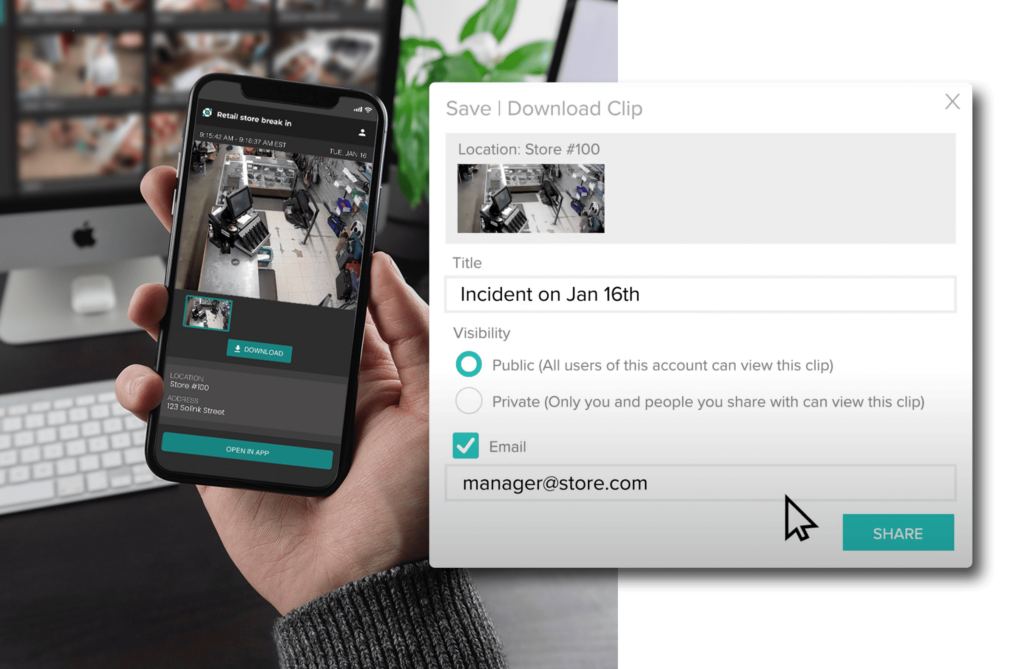
Saving and sharing a clip

Store it where it’s safe: The cloud

Cloud storage means:

  • No physical equipment to break or steal

  • Footage is encrypted and backed up

  • Access it from anywhere

  • No caps on how much you save

With Solink, you choose how long to keep footage. Whether it’s 30 days, 90 days, or indefinitely, you set the rules.


Or go hybrid for full control

Need to meet compliance or corporate policies? Hybrid storage gives you both: on-site backup and cloud access.

You still get:

  • Centralized access

  • Smart search

  • Instant sharing

But you also meet strict retention requirements if you’re in a high-security industry like banking or cannabis.

Get footage to authorities fast

The clock starts ticking the moment something happens.

If you’re scrambling to find and export video, the investigation already has a delay. That delay could cost you – especially when it comes to theft or liability.

Solink makes it easy to send footage to police or internal teams in minutes. No waiting. No second-guessing. No lost evidence.


Insurance moves faster when you send footage faster

If you’re filing a claim, footage is the proof. But only if you can get it into the hands of your provider quickly.

The faster you share it, the faster your claim moves.

Solink gives you the ability to save and send footage the same day something happens. That helps you:

  • Get payouts faster

  • Prove your case clearly

  • Prevent future issues

Take control of your security camera footage

If your system makes it hard to find or share footage, it’s already failing.

Solink makes saving, managing, and sharing video effortless – and powerful. Whether you run one store or a hundred, you get full visibility and control without the hardware headaches.

Book a demo and find out how Solink saves businesses time, money, and stress every day.

FAQ: Security footage storage and sharing made easier

How long should I store my business’s security footage?
It depends on your industry, but most businesses keep 30 to 90 days. Solink lets you set custom retention times per location or camera.

Can I share video clips outside my organization?
Yes. Solink generates secure links you can send to law enforcement, insurance providers, or other stakeholders.

What happens if the internet goes out?
Solink continues to record locally and uploads once the connection is back. No footage is lost.

Is cloud storage secure?
Yes. Solink uses encryption and strict access controls to protect every clip.

Can I get alerts when something happens?
Absolutely. Solink integrates with your business data to send real-time alerts for specific events, so you can jump straight to the footage.

Protect your business today with Solink

Solink’s video analytics and monitoring solutions help create a safe, secure, and healthy environment for businesses.

Schedule a product demo with our experts
*Solink does not currently service private residential properties

Table of Contents

Table of Contents

Security in restaurants has come a long way. Years ago, a lock on the door and a basic camera might have been enough. Today, the stakes are higher. Shrink, liability claims, employee theft, and operational blind spots can put serious pressure on profits. As restaurants grow more complex, so do the security needs.

Full service restaurants (FSRs) face challenges like cash handling, alcohol monitoring, and high staff turnover. Quick service restaurants (QSRs), especially those with drive-thrus, have different pain points – speed of service, order accuracy, and safety at the window. Each setup demands a different approach to visibility and control.

This guide breaks down how to choose the right security system for your type of restaurant. Whether you manage a single location or a national chain, modern systems go far beyond video. They connect data, automate oversight, and unlock smarter ways to run a tighter operation. Let’s look at what matters most for your business.

Two women interact at a restaurant counter with POS terminals; text above promotes a guide on security systems for quick service restaurants.

Unlock smarter operations for your quick service restaurant

Boost speed, security, and savings in every store.

Discover how leading QSRs are using technology to improve service, reduce loss, and streamline operations. This guide covers practical strategies to modernize your restaurant without disrupting your workflow—so you can serve more customers with confidence.

What makes up the best restaurant security systems?

The best restaurant security systems today do more than just record – they think, connect, and respond. They help teams work faster, spot problems sooner, and back decisions with data. But what’s “best” depends on how your restaurant runs. Quick service restaurants need speed and accuracy. Full service restaurants need oversight and accountability.

Let’s start with QSRs.

Features of the best security systems for fast food restaurants or quick service restaurants (QSR)

POS integration: Syncing video and transactions

The best QSR security systems connect your point-of-sale system directly to video. This link makes it easy to verify every transaction with a click. If a customer says they were charged twice, or if an employee voids an order after it’s been handed out, you can go straight to the video and see exactly what happened.

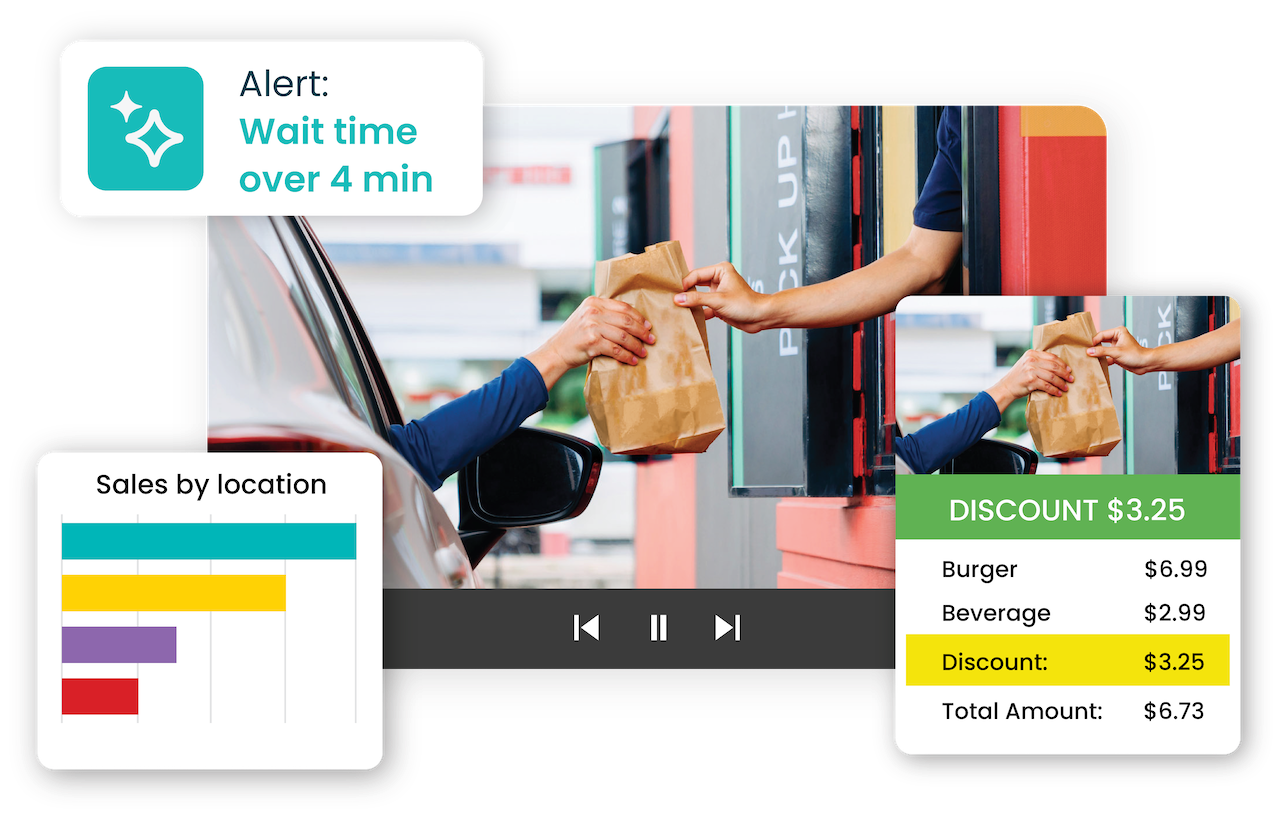
This is more than just loss prevention, it’s operations. You can monitor drive-thru handoff accuracy, track order time stamps, and compare them to video footage in real time. It’s faster, clearer, and easier than sorting through isolated systems.

Overhead view of two people at a store checkout counter. A chart and notification about a $15.70 discount are overlaid on the image, showing sales data and ranking for individuals.

Having zone tracking or video-as-sensor

Modern systems also turn cameras into sensors. You can create zones at key areas: order counters, drive-thru windows, prep stations. Want to see how long it takes for a customer to be greeted? Set a rule and get flagged if it’s missed. Want to know if employees are clocked in but inactive? Create alerts based on motion, or the lack of it.

This level of visibility lets managers track service, prevent time theft, and respond in the moment. It’s not about watching people, it’s about knowing what’s happening, and when.

The ability to search, flag, and report events

You don’t need to dig through hours of footage anymore. Today’s systems let you search by transaction type, employee, terminal, or time. You can flag events, like every refund over $20 and get notified when they happen. And if something goes wrong, reports are easy to generate and share.

With all your video and data in one platform, everything’s searchable and synced. Think of it like a single pane of glass: one view for all the activity in your restaurant. No flipping between systems. No missing context. Just clear answers, fast.

Features of the best security systems for fast full service restaurants (FSR)

POS integration: Verify comps, voids, and tip edits

In FSRs, transactions are more complex. Servers enter orders, split checks, apply comps, and adjust tips, often after the fact. That opens the door to mistakes or intentional manipulation. A strong POS-integrated video system gives you instant access to the footage tied to every key transaction.

Need to see if a manager-approved comp was legit? One click shows who approved it and what was happening at the table. Curious why a server voided an item after closing the check? It’s all linked. This protects revenue and helps managers coach better service with facts, not assumptions.

Table zone tracking: Follow the guest experience

Cameras placed at host stands, server stations, and dining areas help track how guests are being greeted and served. With video zones, you can set alerts if guests wait too long to be acknowledged or if tables sit dirty for too long.

Want to know if your front-of-house team is rotating sections fairly or if bussers are clearing tables fast enough? These patterns are now measurable. The right system shows you what’s happening across shifts without having to stand there and watch.

Event search and flagging: Track service and accountability

In FSRs, flagged events go beyond cash handling. You can set alerts for things like excessive check edits, high discount rates, or multiple manager approvals in a shift. If something feels off in your closeout report, it’s easy to search by employee or terminal and jump right to the video.

It also helps with service recovery. If a guest complains they were overcharged or had a long wait, you can check timestamps, service steps, and video without second-guessing your team or your guest.

Alcohol handling: Monitoring high-risk pours

Alcohol sales bring profit – and risk. Overpouring, undercharging, and unrecorded pours all eat into margins. A smart video system helps track alcohol movement without needing a dedicated liquor inventory tool.

With motion search, a feature that Solink provides, you can filter video to only show when a specific bottle is lifted and put back. Flag every time the top-shelf tequila gets poured. Match it to a check to confirm it was rung in. It’s an easy way to spot patterns, reduce waste, and tighten controls without slowing down service.

the benefits of having the right restaurant security system in place?

As you’ve read above there are so many more things that allow for security cameras to not only be video recorders, but data providers, sensors, operational helpers and overall reporters within your restaurant.

With video connected to your business data, you get the full picture of what’s happening at your locations, without guesswork or delay. Here’s what the right setup delivers daily and the real benefits of integrating with the best video software for your cameras and security systems:

Smarter POS visibility with proactive alerts

When your POS is linked to video, every transaction is backed by context. Voids, comps, refunds, and high-dollar tips are no longer just numbers on a report, they’re moments you can watch.

With thresholds and smart alerts, you don’t have to wait for an issue to show up on your bottom line. Set rules by terminal, shift, or employee to catch unusual activity as it happens. Whether it’s an unexpected refund or an off-hour comp, you’re notified in real time.

A smartphone screen displays a bar chart with a red threshold line at 15. A message below reads: "Threshold: Total number of drive-thru orders over 4 min exceeded threshold of 15.

One place for monitoring and footage

Stop jumping between systems. With an integrated platform, you can see live and recorded video, POS data, and alert history all in one dashboard. Whether you’re checking in from the office or your phone, you get a seamless view across all locations.

This kind of remote access saves time, reduces site visits, and helps operators keep tabs on performance from anywhere.

Faster, easier incident reporting

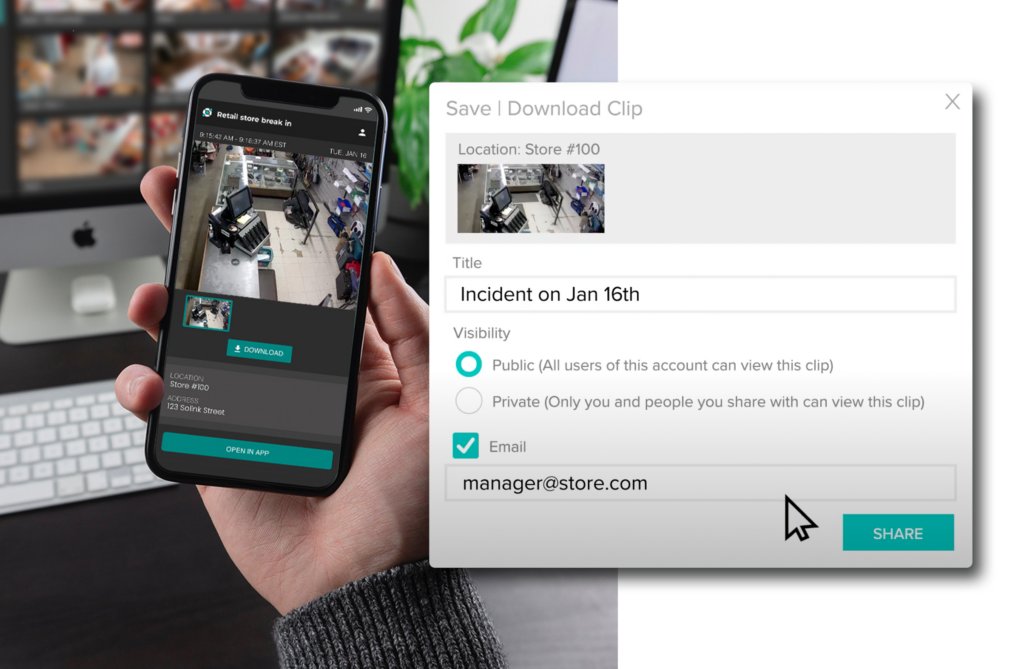
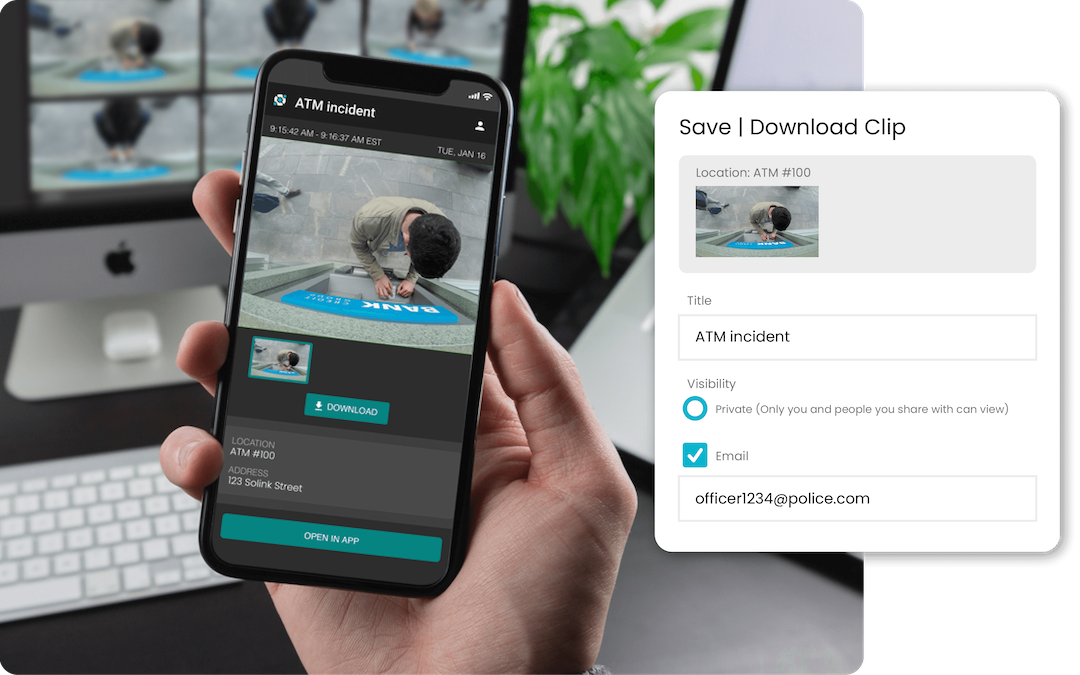
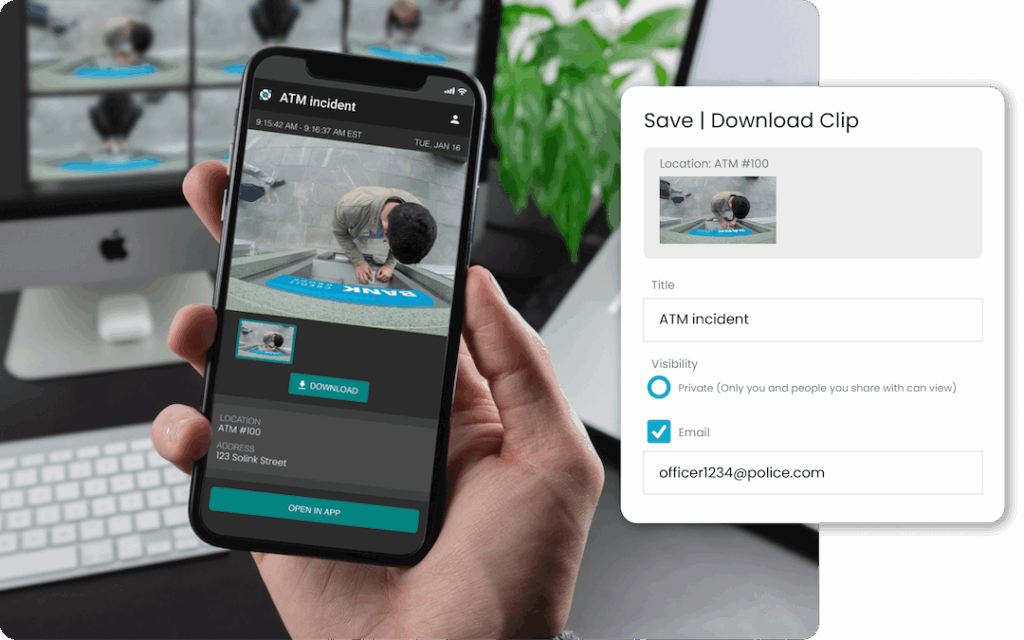
If something goes wrong like a guest dispute, staff complaint, safety issue, sharing video shouldn’t be a hassle. Cloud-based systems let you clip footage, add context, and send it securely with just a few clicks. No downloading to USBs. No walking into courtrooms with DVDs.

It also speeds up insurance claims, legal reviews, and internal investigations. Everything is time-stamped, searchable, and ready when you need it.

Person holding a smartphone displaying surveillance footage of a store. A dialog box on a screen beside it shows options to save or download the clip, titled "Incident on Jan 16th.

Built-in health checks and automatic updates

You don’t need to babysit your security system. Smart platforms run regular system health checks to make sure cameras are recording, storage is functioning, and all components are online.

Security patches and updates install automatically, so you’re always protected, without IT overhead. If a camera goes offline or footage is missing, you’ll know right away.

Staff accountability without micromanaging

Clear visibility leads to smoother operations. When employees know there’s a system in place that tracks performance, accuracy, and service steps, they tend to follow the process more closely.

Managers can reinforce good habits, resolve disputes quickly, and keep daily operations on track without hovering. It’s about creating a culture of accountability, not control.

Understanding how AI in restaurant security is in use today

AI isn’t a future feature, it’s already helping restaurants run tighter operations. Here at Solink we’re building AI directly into our platform, making it easier to spot issues, track behavior, and reduce the time spent digging through footage. It adds another layer of insight without adding more work.

Here’s how Solink uses AI right now and why it work so effectively.

Spot checking with AI-backed alerts

Solink lets managers automate what used to be random checks. With AI-driven spot checking, you can review key transactions, like refunds, voids, or high-ticket orders, paired instantly with video.

Benefits:

  • Confirm the right items were rung in and handed out

  • Coach on-the-spot when a handoff or service step was missed

  • Spend minutes reviewing instead of hours watching

See how McDonald's benefits from Solink security

Line crossing detection to measure foot traffic and track conversion

With Solink’s line crossing tools, you can track every time someone enters a key area like your front door, drive-thru lane, or dining area. AI draws invisible lines and counts crossings, giving you accurate footfall data without needing extra hardware.

Benefits:

  • Measure how many people walk in vs. how many make a purchase

  • Track peak entry times to staff smarter

  • Understand conversion rates by comparing traffic to POS transactions

  • Monitor flow through different zones (host stand, restrooms, seating)

  • Use historical footfall data to plan promotions or layout changes

Zone tracking to monitor activity and movement

Solink turns cameras into sensors by defining zones like the host stand, prep area, drive-thru window, or bar. AI tracks how long people stay in each area, how quickly guests are greeted, or when a zone goes inactive during scheduled hours.

Benefits:

  • Reduce time theft by tracking motion during scheduled shifts

  • Spot service issues early, like long table wait times

  • Ensure critical stations (drive-thru, register) are never left empty

Motion and object search

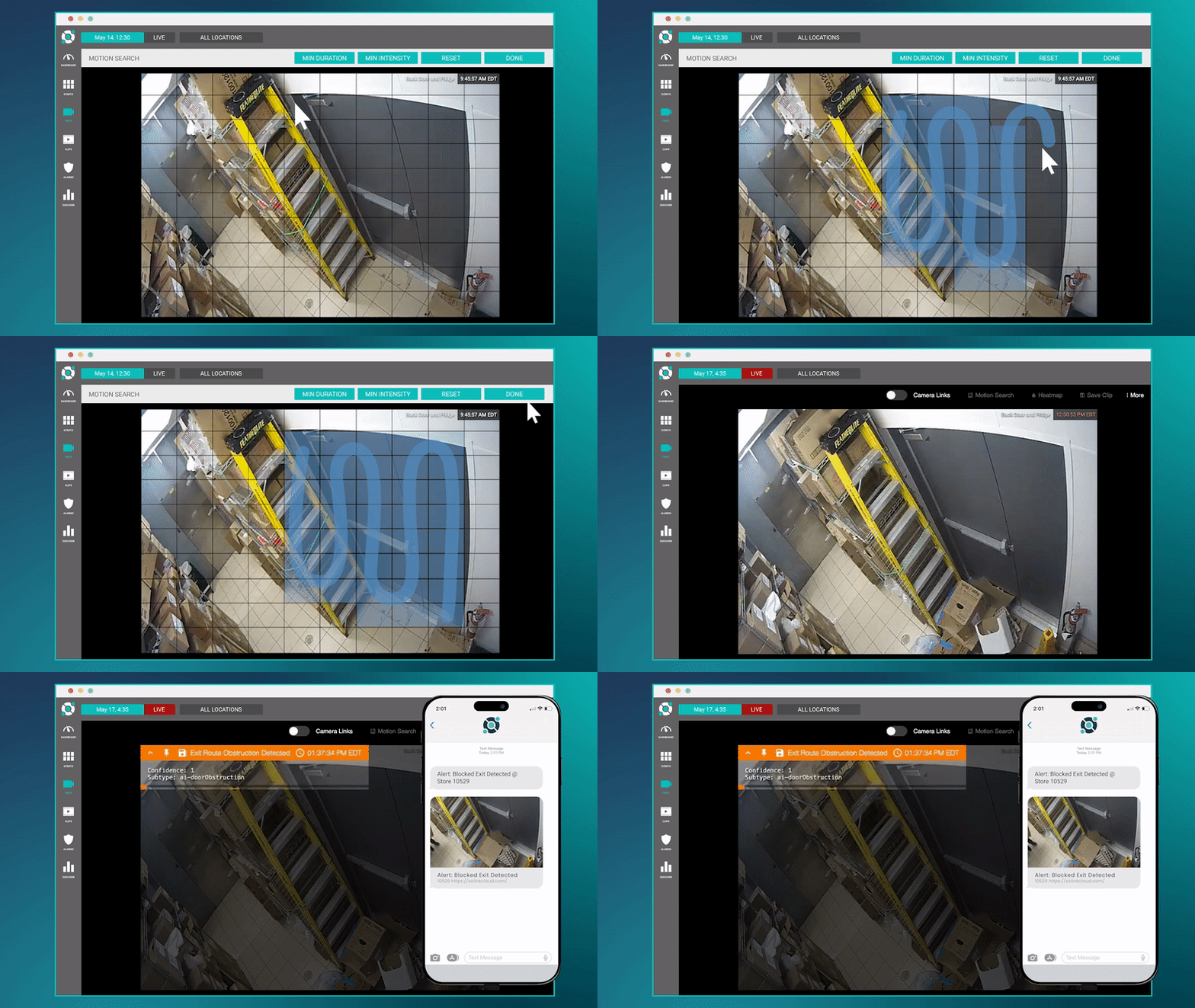
Looking for a missing item or suspicious activity? AI helps filter footage based on motion, object movement, or lack of activity. Want to see every time a bottle of liquor was picked up? Or when a drawer was left open? AI makes it easy to zero in.

Benefits:

  • Resolve loss and service issues fast

  • Reduce overpouring and inventory shrink

  • Avoid watching hours of footage for one 10-second clip

How cloud storage supports the best restaurant security systems

Cloud storage plays a key role in modern restaurant security. It replaces outdated, on-site setups with a secure, flexible way to store and access video without the maintenance headaches.

More scalable and cost-effective

Whether you’re adding one camera or rolling out to a new location, cloud storage scales with you. There’s no need to buy extra hardware or upgrade servers. Everything lives in one secure platform, and your monthly cost stays predictable.

No manual backups or limited storage

You don’t have to swap hard drives, manage DVRs, or worry about storage running out. Set your retention policies and the system takes care of the rest.

Reliable access across all locations – at any time

Footage is always available, whether you’re in-store, at head office, or checking in from your phone. You don’t need to be on-site to review an incident or confirm a transaction. One login gets you into all your locations, instantly.

Why cloud storage is better for restaurants than on-premise systems

On-premise systems tie you to one location. Cloud storage gives you access to video from anywhere, whether you’re managing the floor or off the clock.

Local storage fills up and fails. Cloud storage expands automatically, without manual backups or hardware replacements.

If a break-in happens and the DVR is stolen, your footage is gone. With cloud storage, your video is already backed up and protected.

Opening new locations? Cloud systems scale instantly, no new servers, no extra IT setup, no downtime.

Cloud platforms like Solink alert you if a camera goes offline or storage stops recording. On-prem systems might fail silently.

Sharing on-prem video means exporting clips to USB drives. With cloud, you send a secure link in seconds, no handoffs, no hassle.

On-site systems are another thing to maintain. Cloud storage takes that off your plate, with automatic updates and built-in health checks.

For restaurants, cloud isn’t just easier, it’s safer, faster, and made for how you actually work.

See one of Solink’s newest and most interesting tools below, where you can calculate just how much cloud storage you might need for your video footage at your restaurant.

Don’t guess—Calculate your video storage needs

Use our security storage calculator to determine how much space your business needs to store essential footage in the cloud.

Using a restaurant security system that works with the cameras you already have

Upgrading your restaurant security doesn’t have to mean starting over. A modern system should work with your existing cameras, whether they’re analog, IP, dome, or bullet. That way, you avoid unnecessary hardware costs and disruption to your business.

Check out this article on the best security cameras to use in a restaurant

The key is finding a platform that adds intelligence to your current setup. Look for systems that can layer in features like video search, motion-based alerts, POS integration, and remote access without requiring a full rip-and-replace. This approach gives you immediate value, faster rollout, and easier scaling across locations.

That’s actually exactly how Solink works. Our platform supports most commercial-grade cameras and brings cloud access, data integration, and AI-driven insights to your existing infrastructure.

If you’re expanding or adding new cameras, here’s what works best in restaurant settings:

  • Wide-angle cameras for entrances, dining rooms, and prep lines

  • High-resolution cameras for cash registers and points of sale

  • Outdoor-rated models for drive-thrus, dumpsters, and delivery areas

  • Compact or dome cameras for discrete placement in tight spaces

The right system should meet you where you are using the cameras you already own, while unlocking smarter features that help you run your restaurant more efficiently.

Using your restaurant security system as an alarm system on top of security

Your video security system shouldn’t stop at recording, it should protect your restaurant in real time. When your system doubles as an alarm, your cameras do more than capture footage. They act as active sensors that help detect, verify, and respond to threats as they happen.

Video alarms use motion detection and zone rules to monitor after-hours activity, restricted access points, and vulnerable areas like back doors or storage rooms. Instead of relying only on traditional sensors, your system sends alerts with actual footage so you can confirm what triggered the alarm – no guessing, no false calls.

This turns your security setup into a true all-in-one system:

  • Get real-time alerts when someone enters a protected zone

  • Verify activity through video before dispatching a response

  • Reduce false alarms and avoid fines from unnecessary calls

  • Use existing cameras to avoid extra hardware or rewiring

  • Protect your restaurant 24/7 without extra complexity

Platforms like Solink allow you to add video alarm monitoring without replacing your system. It’s a smarter way to turn passive surveillance into active protection—keeping your restaurant secure day and night.

Every benefit of using your cameras as an alarm system

  • Real-time alerts when motion is detected in restricted areas

  • Video verification so you can see exactly what triggered the alarm

  • Fewer false alarms by confirming real threats before dispatch

  • After-hours protection without relying solely on traditional sensors

  • No extra hardware needed—use the cameras you already have

  • Custom zone settings to monitor high-risk areas like safes, back doors, or delivery bays

  • Event history and saved clips for easy follow-up and incident review

  • Smart escalation based on time of day or type of activity

  • Faster response times when emergency services are only called for verified events

  • 24/7 coverage with less cost and more control

The best restaurant security systems don’t lock you into contracts or specific hardware

The best restaurant security systems give you flexibility, not commitments. Solink doesn’t lock you into long-term contracts or force you to buy proprietary hardware. You can use the cameras you already have, scale at your own pace, and cancel any time. It’s security on your terms, not someone else’s.

With Solink, you keep control. Whether you’re running one location or fifty, you’re not tied to rigid bundles or locked into equipment that only works with one vendor. This makes it easier to adapt as your business grows—add locations, upgrade cameras, or change your setup without starting over. You get all the benefits of an integrated, cloud-based system without the hidden strings. It’s security that works for restaurants, not against them.

Why choosing Solink is the best choice for a restaurant security system

Solink is the ideal choice for a restaurant security system because it combines powerful video monitoring with intelligent data integration to deliver actionable insights. Unlike traditional systems that just store footage, Solink integrates with your existing cameras and POS systems, transforming your video into a valuable tool for improving security, optimizing operations, and minimizing loss. With a user-friendly platform, real-time alerts, remote access, and advanced search features, Solink makes it easy to manage multiple restaurant locations from one dashboard. Plus, Solink prioritizes cybersecurity with end-to-end encryption and regular updates, providing a secure, reliable solution for modern restaurants.

Protect your business today with Solink

Solink’s video analytics and monitoring solutions help create a safe, secure, and healthy environment for businesses.

Schedule a product demo with our experts
*Solink does not currently service private residential properties

Table of Contents

Table of Contents

Analog camera systems used to be the standard for business security. But technology has changed. Now, businesses need more than basic video footage – they need smarter tools, better data, and stronger protection.

If you’re still using analog cameras, you’re not alone. But you might be missing opportunities to improve visibility, reduce risk, and respond faster when something goes wrong.

Here’s what you need to know.

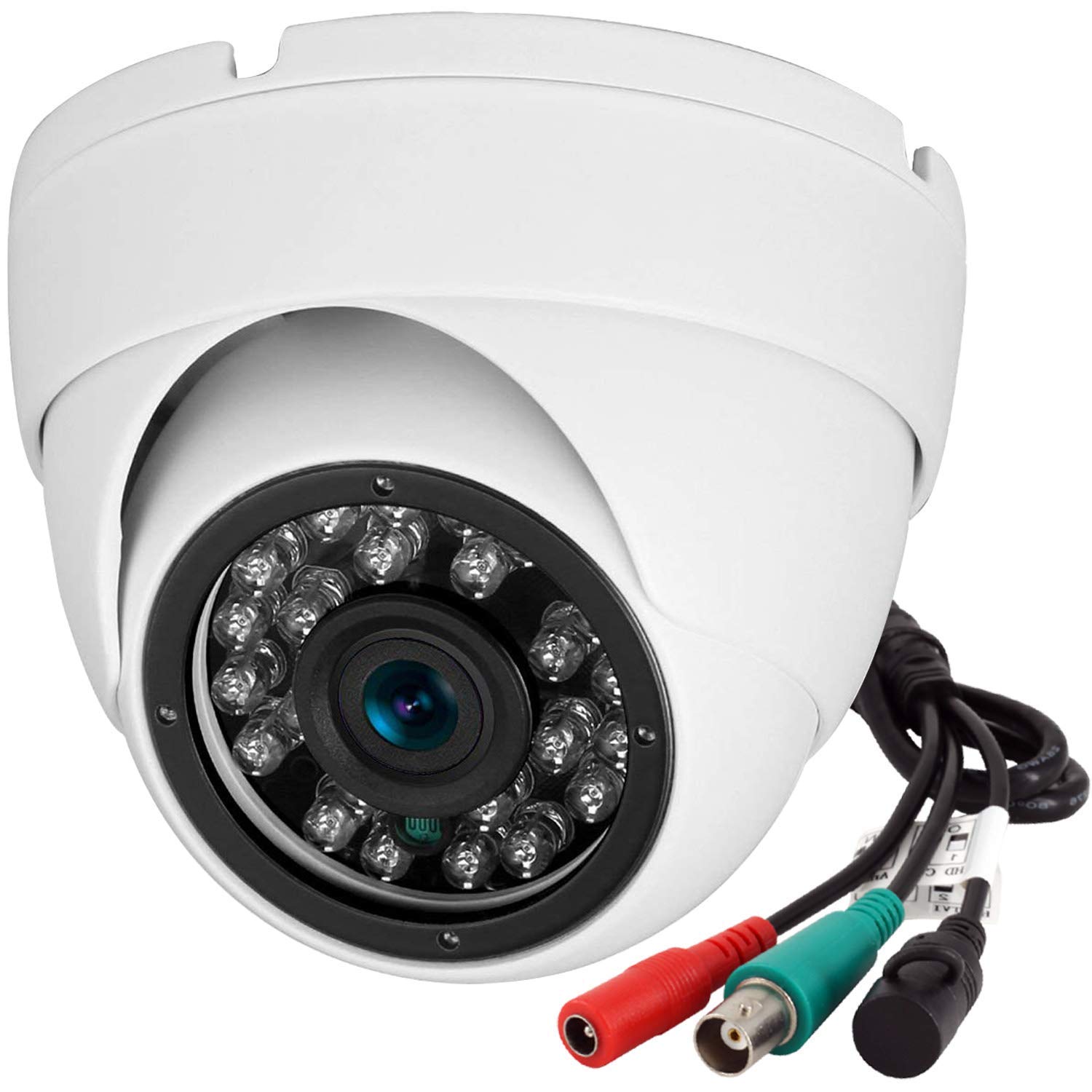
White dome security camera with visible lens and infrared LEDs, shown with attached power and video cables featuring red, green, and black connectors.

What is an analog security camera system?

An analog security camera system operates using traditional technology where cameras capture video and then send it over a coaxial cable to a digital video recorder (DVR). This DVR converts the analog signal into a digital format for viewing, storing, and managing the footage. These systems are known for their straightforward installation and operation. 

With a history that stretches back decades, CCTV analog cameras are a staple in security for businesses, offering a basic level of security without the need for complex infrastructure or high-tech equipment.

Despite their simplicity, analog cameras face limitations in resolution, scalability, and features compared to modern digital solutions. They typically offer lower video quality, which can affect the clarity of footage, especially when zooming in on details. Moreover, analog setups lack the advanced functionalities such as motion detection, remote video access, and analytics that have become standard with digital systems.

However, the value of analog security camera systems lies in their extensive installation base and the simplicity they offer. Many businesses and individuals continue to rely on these systems, seeking ways to enhance their functionality without discarding existing equipment. This is where solutions like Solink play a pivotal role, providing a bridge to modern security technologies while preserving the initial investment in analog security infrastructure.

Why some businesses still use analog security cameras

Businesses keep analog systems for a few reasons:

  • Low cost: Analog equipment is cheaper upfront.

  • Existing infrastructure: If a building is already wired for analog, it’s easier to keep it.

  • Basic needs: Some locations just need video playback, nothing more.

For smaller operations or areas with low foot traffic, analog might seem “good enough.” But in many cases, these systems are now holding businesses back.

See how Solink elevates your security camera system.

The limitations of analog security systems in a digital world

Analog systems weren’t built for modern business. Here’s what you’re missing:

  • Poor video quality: Analog video maxes out at lower resolutions. Zooming in often means pixelated, unusable footage.

  • Limited remote access: Most analog systems don’t support easy remote viewing or mobile access without third-party workarounds.

  • No data integration: Analog video is standalone. It doesn’t sync with POS data, access control logs, or AI tools.

  • Manual search: Finding footage means scrolling through hours of video. There’s no smart search or keyword lookup.

  • Weak scalability: Adding more cameras often means replacing or upgrading the entire system.

These gaps make it harder to prevent theft, investigate incidents, or spot trends across multiple locations.

How to modernize your analog security camera system

Upgrading your video security doesn’t have to mean tearing everything out and starting over. For many businesses, the smarter path is a phased upgrade – one that starts by modernizing what you already have.

This is where a hybrid cloud solution comes in. It lets you keep your analog cameras but still access many of the features you’d expect from a newer system. You get smarter tools, better access, and more control – without the high cost of ripping and replacing your infrastructure.

Here’s what that looks like in practice.


Use a video gateway to connect your DVR to the cloud

The video gateway is the bridge between your existing analog system and the cloud. It connects directly to your DVR (digital video recorder), then streams video footage securely to the cloud.

With Solink, this process is seamless. There’s no need to rewire or physically alter your current setup. The gateway collects live and recorded footage and uploads it to Solink’s secure cloud platform. It works in the background with no disruption to your daily operations.

You keep using your cameras and DVR like usual – but now your footage is also backed up, accessible remotely, and searchable.


Enable remote access on any device

One of the biggest weaknesses of older analog systems is that you need to be onsite to view footage. That doesn’t work for growing businesses with multiple locations or managers who travel.

With Solink’s hybrid system or a hybrid VMS, your video is viewable from anywhere – phone, tablet, or desktop. You can:

  • Watch live feeds from any camera at any location

  • Review past events instantly without physical access to the DVR

  • Check on operations in real time, whether you’re down the street or across the country

This remote access helps you act faster when problems happen. No more waiting until Monday to review weekend footage. You get answers now.

Link your video to business data

Analog footage on its own is hard to search. You have to scrub through hours of video just to find a moment in time. A modern video management system changes that by integrating video with business data.

Here’s how it works:

  • Connect a tool like Solink to your POS (point of sale) system

  • Tag each transaction with a timestamp and location

  • Watch video linked to specific sales, refunds, discounts, or employee logins

This turns your security camera into a business tool. You can search video by:

  • Transaction ID

  • Employee name

  • Customer complaint time

  • Motion during closed hours

It’s faster, smarter, and helps catch internal and external issues before they grow.


Set up smart alerts and detection

Modern systems don’t just record – they tell you when something looks wrong. Solink’s VMS platform lets you create custom alerts based on what matters to your business.

Examples:

  • Motion detected in restricted areas

  • Activity during off-hours

  • Large cash refunds

  • Door held open too long

  • Customer count above expected levels

You get real-time alerts by email or mobile push. That means fewer surprises and faster responses.

Back up your video to the cloud

If your DVR is stolen, damaged, or corrupted, you could lose critical footage. Cloud backup solves that problem.

Solink stores important video clips in the cloud. You can:

  • Automatically save footage flagged by alerts

  • Manually bookmark key events

  • Keep audit trails for compliance or investigations

Video is encrypted and stored securely offsite, so even if your hardware fails, your footage stays protected.

You also save time when sharing video. Instead of burning DVDs or pulling footage on-site, you send a secure link to law enforcement, insurers, or team members.


The result: Modern features without a full upgrade

By connecting your analog system to a modern VMS platform, you:

  • Gain access to cloud storage and remote access

  • Turn raw footage into searchable business data

  • Automate alerts for suspicious behavior

  • Protect footage from theft or damage

  • Share video instantly without exporting files

All this without replacing your cameras or rewiring your building.

For many businesses, this is the most cost-effective first step toward modern video security. When you’re ready, you can upgrade to IP cameras and expand capabilities — but the platform stays the same.

When to consider upgrading to IP cameras

While Solink can help you get the most out of your analog security cameras, it’s undeniable that there are advantages to upgrading to modern IP security cameras. These advanced systems represent a significant leap in technology, offering superior video quality, scalability, and flexibility that analog systems simply cannot match. 

IP cameras transmit video digitally using a network, allowing for higher resolution footage and easier access from remote locations. This digital infrastructure opens up new possibilities for security and business operations alike.

Here are some of the key advantages to having better cameras:

  • Higher video quality: IP cameras provide significantly higher resolution than analog cameras, making it easier to identify faces, license plates, and other important details in your footage.
  • Scalability: Adding new cameras to an IP security system is straightforward, allowing your security network to grow and adapt with your business needs without the complexity often associated with analog systems.
  • Advanced features: IP cameras often come with a range of built-in features such as motion detection and analytics capabilities. These features enhance security measures and provide valuable insights for business operations. For example, people counting makes it possible to calculate conversion rates.
  • Integration capabilities: Modern IP cameras can easily integrate with other security and business systems, offering a unified approach to managing security, data, and insights.

Solink gets the most out of analog security camera systems

Solink is a powerful technology partner for businesses clinging to their analog security camera systems. It offers an innovative solution that bridges the gap between old and new, enhancing traditional systems with modern cloud video security capabilities. 

By integrating with Solink, businesses can extend the life and functionality of their analog cameras, gaining access to advanced features without the need for expensive infrastructure overhauls. Solink proves that even in an era of digital transformation, there is significant value in existing analog systems, ensuring businesses can secure their premises effectively while exploring avenues for future upgrades.

Want to get new ROI out of your existing analog security camera system? See how Solink can help.

Table of Contents

Table of Contents

Finding the best POS systems for small business is more than just a tech upgrade—it’s a game-changer. A modern POS system doesn’t just process payments; it simplifies inventory management, tracks sales, and streamlines operations. For small businesses, where every dollar and decision counts, the right POS system can save time, cut costs, and improve customer experiences.

Whether you’re running a boutique, a café, or an online store, choosing the best POS system tailored to your needs is critical for staying competitive in today’s fast-paced market. In this guide, we’ll explore the top options, key features, and expert tips to help you make the right choice for your business.

Let’s discover how the best POS systems for small business can empower you to manage smarter and grow faster.

What to look for in the best POS systems for small businesses?

Choosing the best POS system for your small business is one of the most important decisions you’ll make. The right system will simplify operations, save time, and help you grow. To ensure you pick the perfect fit, here’s what to consider:

Ease of use

  • Why it matters: A user-friendly POS system minimizes the learning curve for you and your employees, letting you focus on running your business.
  • What to look for:
    • Intuitive interface with easy navigation.
    • Built-in tutorials or training resources.
    • Touchscreen functionality for faster transactions.
    • Customizable options like menu layouts or inventory categories.

Payment processing options

  • Why it matters: Customers expect flexible payment options. A POS system that supports multiple methods improves convenience and ensures you don’t lose sales.
  • What to look for:
    • Credit and debit card processing.
    • Contactless payments like Apple Pay and Google Pay.
    • QR code and mobile wallet compatibility.
    • Affordable transaction fees that fit your budget.

Inventory management

  • Why it matters: Staying on top of inventory prevents stockouts, reduces overstock, and keeps customers happy.
  • What to look for:
    • Real-time tracking of stock levels.
    • Low-stock alerts to avoid running out of popular items.
    • Multi-location inventory management if you have more than one store.
    • Integration with suppliers for seamless reordering.

Sales and performance reporting

  • Why it matters: Data-driven decisions help you identify trends, spot issues, and capitalize on opportunities.
  • What to look for:
    • Detailed reports on sales, profits, and expenses.
    • Insights into best-selling products and peak sales times.
    • Customizable reporting options to focus on what’s most important to you.
    • Dashboards with easy-to-read visuals for quick reviews.

Customer Relationship Management (CRM)

  • Why it matters: Building strong customer relationships increases loyalty and repeat business.
  • What to look for:
    • Tools to track customer purchase history and preferences.
    • Loyalty programs to reward repeat customers.
    • Marketing features like email or text promotions.
    • The ability to collect and analyze customer feedback.

Employee management

  • Why it matters: Streamlining employee scheduling and tracking improves efficiency and ensures accountability.
  • What to look for:
    • Time clock integration for tracking hours worked.
    • Role-based access to limit sensitive information.
    • Performance tracking to monitor individual sales or service quality.
    • Shift scheduling and payroll integration to save time on admin tasks.

Integration capabilities

  • Why it matters: A POS system that connects to your existing tools saves time and avoids duplicate work.
  • What to look for:
    • Security software integrations.
    • E-commerce platform integration for online and in-store sales syncing.
    • Accounting software compatibility for automated bookkeeping.
    • Third-party app support for marketing, analytics, or inventory forecasting.
    • Open API for custom integrations as your business grows.

Hardware requirements

  • Why it matters: The hardware you choose impacts the system’s usability and upfront costs.
  • What to look for:
    • Compatibility with existing devices like tablets or printers.
    • Scalable hardware options for when your business grows.
    • Portable devices for mobile businesses or pop-up shops.
    • Reliable receipt printers, barcode scanners, and cash drawers.

Cloud-based vs. On-premises systems

  • Why it matters: The type of system affects flexibility, security, and how you access data.
  • What to look for:
    • Cloud-based POS:
      • Access data from anywhere with an internet connection.
      • Automatic updates and backups.
      • Lower upfront hardware costs.
    • On-premises POS:
      • Works offline without internet dependency.
      • Greater control over data storage.

Scalability and flexibility

  • Why it matters: Your business may grow, and your POS should be able to grow with it.
  • What to look for:
    • The ability to add more registers, devices, or users.
    • Support for multi-location businesses.
    • Flexibility to adapt to changing business needs, like new product lines or services.

Cost and value

  • Why it matters: Balancing upfront costs with long-term value ensures you get the most for your investment.
  • What to look for:
    • Transparent pricing without hidden fees.
    • Subscription plans that fit your budget.
    • Reasonable transaction fees for payment processing.
    • Support included in the price or offered at a fair rate.
The best POS systems for small businesses combine ease of use, powerful features, and flexibility to grow with you. By focusing on these key areas, you’ll find a solution that simplifies operations, keeps customers happy, and supports your business goals.
Choosing the best POS system for your small business is one of the most important decisions you’ll make. The right system will simplify operations, save time, and help you grow. To ensure you pick the perfect fit, here’s what to consider:

Ease of use

Why it matters: A user-friendly POS system minimizes the learning curve for you and your employees, letting you focus on running your business.

What to look for:
  1. Intuitive interface with easy navigation.
  2. Built-in tutorials or training resources.
  3. Touchscreen functionality for faster transactions.
  4. Customizable options like menu layouts or inventory categories.

Payment processing options

Why it matters: Customers expect flexible payment options. A POS system that supports multiple methods improves convenience and ensures you don’t lose sales.

What to look for:
  1. Credit and debit card processing.
  2. Contactless payments like Apple Pay and Google Pay.
  3. QR code and mobile wallet compatibility.
  4. Affordable transaction fees that fit your budget.

Inventory management

Why it matters: Staying on top of inventory prevents stockouts, reduces overstock, and keeps customers happy.

What to look for:
  1. Real-time tracking of stock levels.
  2. Low-stock alerts to avoid running out of popular items.
  3. Multi-location inventory management if you have more than one store.
  4. Integration with suppliers for seamless reordering.

Sales and performance reporting

Why it matters: Data-driven decisions help you identify trends, spot issues, and capitalize on opportunities.

What to look for:
  1. Detailed reports on sales, profits, and expenses.
  2. Insights into best-selling products and peak sales times.
  3. Customizable reporting options to focus on what’s most important to you.
  4. Dashboards with easy-to-read visuals for quick reviews.

Customer Relationship Management (CRM)

Why it matters: Building strong customer relationships increases loyalty and repeat business.

What to look for:
  1. Tools to track customer purchase history and preferences.
  2. Loyalty programs to reward repeat customers.
  3. Marketing features like email or text promotions.
  4. The ability to collect and analyze customer feedback.

Employee management

Why it matters: Streamlining employee scheduling and tracking improves efficiency and ensures accountability.

What to look for:
  1. Time clock integration for tracking hours worked.
  2. Role-based access to limit sensitive information.
  3. Performance tracking to monitor individual sales or service quality.
  4. Shift scheduling and payroll integration to save time on admin tasks.

Integration capabilities

Why it matters: A POS system that connects to your existing tools saves time and avoids duplicate work.

What to look for:
  1. Security software integrations.
  2. E-commerce platform integration for online and in-store sales syncing.
  3. Accounting software compatibility for automated bookkeeping.
  4. Third-party app support for marketing, analytics, or inventory forecasting.
  5. Open API for custom integrations as your business grows.

Hardware requirements

Why it matters: The hardware you choose impacts the system’s usability and upfront costs.

What to look for:
  1. Compatibility with existing devices like tablets or printers.
  2. Scalable hardware options for when your business grows.
  3. Portable devices for mobile businesses or pop-up shops.
  4. Reliable receipt printers, barcode scanners, and cash drawers.

Cloud-based vs. On-premises systems

Why it matters: The type of system affects flexibility, security, and how you access data.

What to look for:

Cloud-based POS:
  1. Access data from anywhere with an internet connection.
  2. Automatic updates and backups.
  3. Lower upfront hardware costs.
On-premises POS:
  1. Works offline without internet dependency.
  2. Greater control over data storage.

Scalability and flexibility

Why it matters: Your business may grow, and your POS should be able to grow with it.

What to look for:
  1. The ability to add more registers, devices, or users.
  2. Support for multi-location businesses.
  3. Flexibility to adapt to changing business needs, like new product lines or services.

Cost and value

Why it matters: Balancing upfront costs with long-term value ensures you get the most for your investment. What to look for:
  1. Transparent pricing without hidden fees.
  2. Subscription plans that fit your budget.
  3. Reasonable transaction fees for payment processing.
  4. Support included in the price or offered at a fair rate.
The best POS systems for small businesses combine ease of use, powerful features, and flexibility to grow with you. By focusing on these key areas, you’ll find a solution that simplifies operations, keeps customers happy, and supports your business goals.

How to best choose the top POS system for your small business

Choosing the right POS system for your small business is all about understanding your specific needs and finding a solution that aligns with them. A well-chosen POS system should simplify operations, improve customer experiences, and adapt as your business grows. Here’s how to make the best decision:

Start by evaluating your business operations. Consider how you currently handle payments, track inventory, manage staff, and analyze sales. Do you need a system that integrates seamlessly with your online store? Or are you more focused on managing inventory across multiple physical locations? Identifying your priorities will help narrow down the options.

Think about ease of use. A complex system might offer advanced features, but if it’s too complicated, it could slow your team down and increase training time. Look for a POS system with an intuitive interface that simplifies everyday tasks like ringing up sales, managing stock, and accessing reports.

Integration is another key factor. The top POS systems connect with other tools you already use, such as video security and video analytics systems like Solink, accounting software, e-commerce platforms, and marketing apps. This connectivity eliminates the need for manual data entry and ensures smooth workflows across your business.

Consider your payment processing needs. Today’s customers expect a range of payment options, from credit and debit cards to digital wallets and contactless payments. The system you choose should support these methods while keeping transaction fees manageable.

Look for robust reporting and analytics features. Data-driven decisions are critical for growth, and the right POS system will provide detailed insights into sales trends, customer behavior, and staff performance. This information helps you refine strategies and improve profitability.

Don’t overlook scalability. A system that works for you today should also support your future growth. Whether you’re planning to open new locations, expand your product offerings, or serve more customers, your POS system should scale effortlessly to meet those needs.

Finally, assess the total cost. Beyond the upfront price, consider ongoing subscription fees, transaction costs, and potential charges for hardware or integrations. Ensure that the value you’re getting aligns with your budget and long-term goals.

Choosing the top POS system for your small business may take time, but investing in the right solution will streamline your operations, reduce headaches, and set your business up for success.

Popular choices for small business POS systems right now

Square

Square is a favorite among small business owners due to its simplicity and affordability. It’s perfect for startups, boutiques, and mobile businesses.

Best features:
  • Free POS software with no monthly fees for basic features.
  • Built-in payment processing with transparent rates.

Toast

Toast is designed specifically for the restaurant and foodservice industry, offering tools to handle everything from table management to online ordering.

Best features:
  • Customizable workflows for quick-service, full-service, and hybrid dining models.
  • Built-in tools for menu management, kitchen coordination, and delivery.

Shopify POS

Shopify is an excellent choice for retailers looking to merge online and in-person sales. It’s designed for seamless omnichannel operations.

Best features:
  • Integrated inventory management across online and physical stores.
  • Tools for customer profiles and loyalty tracking.

Clover

Clover offers a range of hardware and software solutions that cater to various industries, from retail to service-based businesses.

Best features:
  • Scalable hardware options, from handheld devices to full POS terminals.
  • Customizable apps and features for inventory, payments, and reporting.

Lightspeed

Lightspeed is a robust POS system perfect for retail stores, restaurants, and businesses with complex inventory needs.

Best features:
  • Advanced inventory tools for tracking, reordering, and reporting.
  • E-commerce integration for seamless online and offline sales.

PayPal Zettle

PayPal Zettle is ideal for small businesses that need a simple, mobile-friendly POS system.

Best features:
  • Easy-to-use card readers for mobile transactions.
  • Integration with PayPal for streamlined payments.

Revel Systems

Revel Systems is a highly customizable POS solution designed for restaurants, retail, and service businesses.

Best features:
  • Advanced inventory and sales tracking tools.
  • Flexible payment options, including contactless and digital wallets.
These POS systems stand out for their reliability, features, and ability to cater to the specific needs of small businesses. Whether you’re in retail, food service, or run a hybrid operation, there’s a solution here that can help you streamline your processes and grow your business.

Common mistakes to avoid when searching for a POS for small business

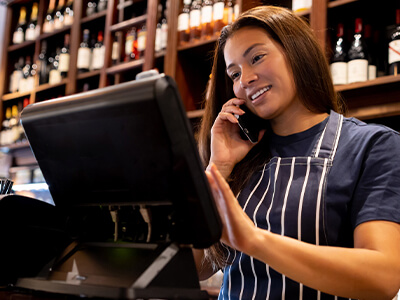
A bartender talking on the phone at a wine bar.

Focusing only on upfront costs

It’s tempting to choose the cheapest option, but upfront costs don’t tell the whole story. Many systems have hidden fees, high transaction rates, or limited features that lead to higher costs over time.

What to do instead: Evaluate the total cost of ownership (TCO), including hardware, software, subscription plans, transaction fees, and potential upgrade costs.

Ignoring customer support quality

Even the best POS system isn’t immune to issues, and poor customer support can leave you stranded during critical business hours.

What to do instead: Research customer support options thoroughly. Look for 24/7 support, quick response times, and multiple contact methods like chat, phone, or email. User reviews often reveal how responsive a vendor is when problems arise.

Choosing a system without testing it first

A system may look great on paper but might not align with your workflow. Skipping demos or trials can result in frustration later.

What to do instead: Always request a demo or trial before committing. Use the trial to simulate real-world scenarios your business faces, like high-volume transactions or inventory updates. Involve your team to see if they find it user-friendly.

Overlooking scalability

A POS system that meets your current needs might fall short as your business grows. This can result in costly upgrades or migrations in the future.

What to do instead: Think long-term. Look for a POS system that can handle increased inventory, additional locations, or new sales channels. Systems with modular features or flexible plans are a safer investment

Failing to check industry-specific features

Not all POS systems are created equal, and choosing a generic system may leave you without key tools for your industry.

What to do instead: Identify industry-specific needs. For example:
  • Restaurants might need table management and split checks.
  • Retailers often require advanced inventory tracking and barcode scanning.
  • Service businesses benefit from appointment scheduling and CRM tools.
Avoiding these mistakes ensures that your POS system becomes a tool for growth rather than a source of frustration. By taking a thoughtful, thorough approach, you’ll choose a system that truly supports your small business’s success.

Integrating your small business POS with your security camera system software: Solink does that

For small business owners, integrating a POS system with a security camera system isn’t just a convenience—it’s the very best way to enhance oversight, reduce losses, and streamline operations. Solink specializes in combining these two essential tools, giving you unparalleled visibility and control over your business.

How POS and security camera integration works

By syncing your POS system with security cameras, you gain the ability to match transaction data with video footage in real time. Each sale, refund, or voided transaction is linked to a specific moment on camera, allowing you to review it instantly.

For example:
  • Prevent theft: Spot suspicious activity like under-ringing, fake refunds, or unauthorized discounts by reviewing transactions alongside corresponding video footage.
  • Verify transactions: Quickly confirm customer disputes by checking video proof of payments or product exchanges.
  • Monitor operations: Observe how staff handle high-traffic periods, upsell opportunities, or customer service interactions.

The benefits of using Solink alongside your POS

  1. Simplified investigations Manually sifting through hours of footage to find an incident wastes time and resources. With Solink, search for specific events—like cash drawer openings, voids, or discounts—and jump straight to the relevant footage.
  2. Real-time alerts Set up custom alerts for unusual activities. Solink can notify you of high-risk transactions, such as excessive discounts, large refunds, or late-night activity, so you can act immediately.
  3. Improved loss prevention Shrinkage costs small businesses billions every year. Solink helps you reduce losses by identifying theft, fraud, and operational inefficiencies with a data-driven approach.
  4. Enhanced employee accountability With POS-integrated video, employees know their actions are documented, encouraging adherence to company policies and reducing errors or misconduct.
  5. Centralized oversight Whether you operate one store or several, Solink lets you monitor all locations from a single platform. Combine POS data and video feeds for a comprehensive overview of your business, no matter where you are.
Integrating your small business POS with your security camera system through Solink is more than just a smart upgrade—it’s a way to transform the way you manage and protect your business. By pairing transaction data with real-time video, you’ll unlock actionable insights and ensure every aspect of your business is running smoothly. Request a demo today to see Solink in action.

Table of Contents

Table of Contents

This article explores the pressing issue of school security problems and solutions, focusing on the most common challenges faced by educational institutions today. From unauthorized access to cyber threats, we delve into each problem, outlining its impact on school safety and the learning environment. Additionally, we provide practical solutions aimed at enhancing security measures and fostering a safer school community.

Understanding the importance of school security

School security is not just about protecting buildings and assets. It’s about safeguarding our future. Every student and teacher has the right to feel safe within the walls of their educational institution. 

When schools are secure, students can focus on learning, teachers can focus on teaching, and the school community can thrive. The emotional well-being of everyone on campus improves, fostering an environment where learning and personal growth are prioritized. A secure school is the foundation of a vibrant, productive, and nurturing educational experience.

See how Solink elevates your security camera system.

Key components of a comprehensive school security plan

Creating a comprehensive school security plan involves several critical elements. Each component plays a vital role in ensuring the safety and well-being of students, staff, and visitors. 

Here’s a look at the key components:

  • Implement robust access control measures: Ensure that only authorized individuals can enter the school premises, using technologies like electronic ID cards or biometric systems.
  • Install an effective cloud-based security system: Use video security to monitor school grounds, helping to deter unauthorized access and identify issues as they arise.
  • Develop and practice emergency response plans: Regularly update and drill emergency procedures for various scenarios, including natural disasters, fires, and lockdown situations. In addition, video alarms can be a critical advantage during emergency responses.
  • Promote a strong culture of awareness and communication: Encourage students and staff to report suspicious activities and maintain open lines of communication for sharing concerns.
  • Provide comprehensive staff training: Equip school personnel with the necessary skills and knowledge to handle security incidents and emergencies effectively.
  • Focus on cyber security: Protect sensitive information and school networks from cyber threats through firewalls, secure passwords, and cyber security education.
  • Engage in community collaboration: Work with local law enforcement and community organizations to enhance school safety through partnerships and shared resources.

20 school security problems and solutions

Exploring school security reveals a spectrum of challenges that educational institutions encounter in safeguarding their environments. This landscape encompasses both physical threats and digital exposures, impacting the welfare and educational outcomes of students and staff. 

The following list outlines 20 prevalent school security issues, complemented by actionable solutions designed to mitigate these concerns and elevate the security standards within schools. 

  1. Unauthorized access
  2. Lack of video monitoring
  3. Inadequate emergency preparedness
  4. Weapons on campus
  5. Physical assaults and fights
  6. Bullying and cyberbullying
  7. Theft and burglary
  8. Vandalism and property damage
  9. Inadequate access control
  10. Poor communication systems
  11. Ineffective discipline policies
  12. Lack of mental health support
  13. Drug and substance abuse
  14. Neglect of cybersecurity measures
  15. Insufficient staff training
  16. Poor lighting and visibility
  17. Overcrowding
  18. Lack of parental involvement
  19. Peer pressure and gang activity
  20. Inadequate incident reporting systems

1. Unauthorized access

Unauthorized access occurs when individuals enter school premises without permission, posing a direct threat to the safety of students and staff. This issue is critical because it can lead to dangerous situations, including potential harm to students and the disruption of school activities. The impact of unauthorized access is significant, as it undermines the school’s ability to provide a safe learning environment and can lead to increased anxiety among students, parents, and staff.

Solutions to prevent unauthorized access include installing comprehensive access control systems, such as electronic locks and entry systems that require ID cards or codes. Schools can also employ security personnel to monitor entrances and exits and conduct regular security audits to identify and address vulnerabilities. Educating students and staff on the importance of security protocols and ensuring strict adherence to access control measures are also vital steps.

2. Lack of video monitoring

A lack of monitoring in schools can lead to insufficient monitoring of school grounds, making it difficult to detect and respond to security breaches or inappropriate behavior. This gap in security can result in unchecked vandalism, bullying, and other unsafe activities. The absence of video monitoring also makes it challenging to investigate incidents after they occur, as there may be no video evidence to review.

Implementing a robust cloud video security system, like those offered by Solink, can significantly enhance school security. These systems allow for real-time monitoring of critical areas and can deter potential offenders. Additionally, integrating video monitoring with access control systems ensures a layered security approach, enabling swift identification and response to security incidents.

3. Inadequate emergency preparedness

Schools without comprehensive emergency preparedness plans face challenges in responding effectively to crises such as fires, natural disasters, or active shooter scenarios. Inadequate preparedness can lead to confusion, panic, and potentially increase the risk of harm during emergencies. The impact is a compromised ability to protect students and staff and to resume normal operations promptly after an incident.

To improve emergency preparedness, schools should develop and regularly update detailed emergency response plans, conduct drills to practice these plans, and ensure that all staff and students are familiar with emergency procedures. Investing in communication systems that can quickly relay information during an emergency is also crucial. Collaboration with local emergency services for joint training sessions can further enhance the school’s readiness to handle crises.

4. Weapons on campus

The presence of weapons on school campuses is a severe concern that threatens the safety and well-being of students and staff. Weapons can lead to tragic incidents, create a climate of fear, and disrupt the educational process. The potential for harm, both physical and psychological, is substantial, making this issue a top priority for schools to address.

Solutions include implementing strict no-weapon policies, conducting regular locker and bag checks, and employing metal detectors at school entrances. Educating students about the dangers of weapons and promoting a culture of non-violence are also essential. Schools can establish anonymous reporting systems for students to report concerns without fear of retribution.

5. Physical assaults and fights

Physical assaults and fights among students or between students and outsiders can cause injuries, foster a hostile school environment, and detract from the educational mission. Such incidents can lead to a cycle of violence, retaliation, and fear, significantly impacting student well-being and academic performance.

Implementing conflict resolution and peer mediation programs can help address the underlying causes of physical confrontations. Training staff to de-escalate conflicts effectively and establishing clear consequences for violent behavior are also crucial measures. Creating a positive school climate that emphasizes respect and inclusivity can reduce the incidence of physical altercations.

6. Bullying and cyberbullying

Bullying and cyberbullying affect students’ mental health, leading to anxiety, depression, and decreased academic performance. The anonymity and reach of the internet exacerbate the impact of cyberbullying, making it a pervasive issue. These behaviors create an unsafe and unwelcoming school environment, affecting victims, perpetrators, and bystanders alike.

Solutions involve implementing anti-bullying programs that educate students about the impact of their actions and promote empathy and respect. Schools should establish clear policies against bullying, provide support for victims, and impose appropriate consequences for perpetrators. Encouraging open communication between students, parents, and teachers can also help identify and address bullying early on.

7. Theft and burglary

Theft and burglary in schools result in the loss of personal and school property, including valuable equipment and resources. This not only leads to financial loss but can also create a climate of mistrust and insecurity among the school community. The disruption caused by these incidents can affect the learning environment and necessitate increased security measures.

Enhancing physical security through improved locks, secure storage for valuable items, and a school security system can deter theft and burglary. 

Encouraging students and staff to be vigilant and to report suspicious activity promptly can also help prevent these crimes. Furthermore, implementing inventory management practices for school equipment can aid in tracking and recovering stolen items.

8. Vandalism and property damage

Vandalism and property damage to school facilities, such as graffiti, broken windows, and damaged equipment, result in costly repairs and maintenance. These acts of destruction not only affect the school’s appearance but also its budget and the morale of the school community. The presence of vandalism can contribute to a negative and unsafe school environment.

Preventative measures include installing school security cameras to deter vandals and quickly identify perpetrators, as well as implementing educational programs that foster respect for school property. Engaging students in the upkeep and beautification of their school can also reduce the incidence of vandalism. Prompt repair of any damage is important to avoid giving the impression that vandalism is tolerated.

9. Inadequate access control

Inadequate access control systems in schools allow unauthorized individuals to enter buildings unrestricted, posing significant security risks. Effective access control is essential for managing who enters and exits the school, thereby protecting students and staff from potential threats. Weak access control can lead to unauthorized access, theft, and other security breaches.

Upgrading to electronic access control systems that require key cards or codes for entry can significantly enhance school security. Implementing visitor management procedures, where visitors must sign in and wear badges, helps monitor and control access. Regularly reviewing and updating access control policies and infrastructure ensures that they remain effective in addressing new security challenges.

10. Poor communication systems

Poor communication systems in schools can hinder the effective dissemination of information during emergencies, potentially compromising the safety of students and staff. Efficient communication is crucial for coordinating responses to incidents and for keeping the school community informed about safety measures and procedures.

Investing in advanced communication technologies, such as mass notification systems that can send alerts via multiple channels (text, email, and intercom), ensures that critical information reaches everyone quickly. Regular training for staff and students on how to use these systems and what to do in an emergency is also essential. Establishing clear communication protocols and practicing them through drills can improve the school’s emergency response.

11. Ineffective discipline policies

Inconsistent or lenient discipline policies may not adequately deter disruptive behavior, leading to a chaotic school environment where students feel unsafe. Effective discipline policies are necessary to maintain order, ensure the safety of the school community, and promote a positive learning atmosphere. Without clear consequences for actions, students may not understand the seriousness of their behaviors.

Developing and enforcing clear, fair, and consistent discipline policies is crucial. These policies should be developed with input from teachers, parents, and students to ensure they are comprehensive and equitable. Restorative justice practices can also be effective, focusing on repairing harm and rebuilding relationships rather than solely on punishment. Regular review and adjustment of discipline policies ensure they meet the school’s evolving needs.

12. Lack of mental health support

A lack of mental health support in schools can leave students struggling with issues such as anxiety, depression, and trauma without adequate help. This can affect their academic performance, social interactions, and overall well-being. Untreated mental health issues can also lead to more significant problems, including substance abuse and violence.

Providing comprehensive mental health services, including counseling and support groups, is essential for addressing students’ needs. Schools should also train staff to recognize signs of mental health issues and to respond appropriately. Partnerships with local mental health organizations can enhance the resources available to students and staff. Promoting a school culture that prioritizes mental health and well-being is also critical.

13. Drug and substance abuse

The presence and abuse of drugs within school premises pose significant health and safety risks to students. Substance abuse can lead to academic decline, physical health issues, and increased risk of accidents and violence. Schools play a crucial role in preventing substance abuse and providing support for affected students.

Implementing comprehensive drug education programs that inform students about the risks and consequences of substance abuse is crucial. Schools should also establish clear policies against drug use, provide access to counseling and rehabilitation services, and encourage a supportive environment where students can seek help without stigma. Collaboration with law enforcement and community organizations can also enhance prevention and intervention efforts.

14. Neglect of cybersecurity measures

In an increasingly digital world, cybersecurity threats such as data breaches, phishing, and hacking pose significant risks to schools. Sensitive information about students and staff can be compromised, leading to identity theft and other forms of cybercrime. Cybersecurity is critical for protecting the integrity of school data and ensuring the privacy of the school community.

Strengthening cybersecurity measures includes implementing robust firewalls, regularly updating software, and educating students and staff about safe online practices. Conducting regular cybersecurity audits and drills can help identify vulnerabilities and improve the school’s preparedness for cyber attacks. Establishing clear protocols for responding to cybersecurity incidents is also essential.

15. Insufficient staff training

School staff may not be adequately trained to handle security incidents or to use security technology effectively, which can hinder the school’s ability to respond to emergencies and maintain a safe environment. Staff training is essential for ensuring that all personnel are prepared to take appropriate actions in a variety of situations.

Providing regular training sessions on emergency response, conflict resolution, and the use of security technology can empower staff to act confidently and effectively. Training should also cover recognizing and addressing signs of bullying, mental health issues, and substance abuse. Encouraging staff to participate in ongoing professional development opportunities related to school security can further enhance their skills and knowledge.

16. Poor lighting and visibility

Inadequate lighting and visibility in certain areas of the school, such as parking lots, hallways, and outdoor spaces, can create unsafe conditions for students and staff. Poor lighting can lead to accidents and make it easier for unauthorized individuals to enter the school unnoticed. Ensuring that all areas of the school are well-lit and visible is crucial for preventing accidents and enhancing security.

Upgrading lighting systems to provide adequate illumination in all areas, especially those that are currently poorly lit, can significantly improve safety. Regular maintenance checks to ensure that all lighting fixtures are working correctly are also important. Additionally, implementing landscape design that maximizes visibility and reduces hiding spots can further enhance security.

17. Overcrowding

Overcrowded school facilities can lead to increased conflicts, make it challenging to monitor and manage student behavior, and hinder effective teaching and learning. Overcrowding can strain resources, including classroom space, teacher attention, and security measures, making it difficult to maintain a safe and productive learning environment.

Addressing overcrowding requires strategic planning and investment in infrastructure to ensure adequate space for all students. This may include building new facilities, expanding existing ones, or implementing policies to manage enrollment numbers. Adopting innovative teaching methods and classroom management strategies can also help mitigate the effects of overcrowding and ensure that students receive the attention and support they need.

18. Lack of parental involvement

Limited engagement from parents in the school community can hinder efforts to address students’ behavioral and security issues. Parental involvement is crucial for reinforcing school policies and expectations, supporting academic and extracurricular activities, and fostering a collaborative environment. When parents are not actively involved, it can be challenging to address concerns and implement effective solutions.

Encouraging greater parental involvement through regular communication, parent–teacher meetings, and volunteer opportunities can strengthen the partnership between the school and families. Offering workshops and resources to help parents support their children’s education and well-being can also increase engagement. Building a welcoming school culture that values parental input and collaboration is essential for creating a supportive and secure environment.

19. Peer pressure and gang activity

Peer pressure and gang activity within schools can lead to unsafe behaviors and environments. Students may feel compelled to engage in activities that compromise their safety and the safety of others. Gang presence can also lead to violence, drug use, and other criminal activities, undermining the school’s educational mission and security.

Implementing programs that teach students about the risks and consequences of gang involvement and negative peer pressure is essential. Schools should also provide positive extracurricular activities that offer alternatives to gang participation and foster a sense of community. Partnering with law enforcement and community organizations to address gang activity and support at-risk students can further reduce the impact of these issues.

20. Inadequate incident reporting systems

The absence of efficient systems for reporting and tracking security incidents can prevent timely responses and hinder preventive measures. Without a reliable incident reporting system, schools may not be aware of patterns of behavior or areas of concern that require intervention. This can lead to unresolved issues and a lack of accountability.

Developing a user-friendly, confidential incident reporting system that allows students, staff, and parents to report concerns safely is crucial. Training the school community on how to use this system and ensuring that all reports are taken seriously and investigated promptly can improve school safety. Regularly reviewing incident reports and using the data to inform security policies and practices can also help prevent future incidents.

Solink completes your school security camera system

To address the varied school security challenges above, integrating a robust security system is paramount. Solink stands out as a comprehensive solution, seamlessly enhancing school security measures. 

By offering advanced video video monitoring capabilities, Solink not only aids in monitoring and preventing unauthorized access but also plays a crucial role in resolving the wide range of security concerns listed above. Its ability to integrate with existing systems and provide real-time insights ensures a safer learning environment for students and peace of mind for educators and parents alike. 

With Solink, schools can achieve a holistic security posture, ensuring every aspect of campus safety is covered.

Want to see how Solink can promote a safe learning environment? Sign up for a demo today.

Table of Contents

Table of Contents

Running a restaurant means juggling labor, food costs, customer service, and compliance—all at once. But without clear visibility into daily operations, it’s easy to miss problems that impact your bottom line.

That’s where your security system comes in.

Modern video security isn’t just about loss prevention. When paired with business data, it becomes a tool to streamline restaurant operations, improve staff performance, and reduce costly mistakes.

In this guide, we’ll break down how to use your security system to:

  • Cut waste

  • Track staffing

  • Monitor multiple locations

  • Improve training

  • Stay compliant

Whether you run one store or fifty, the right system can help you see more, do more, and run leaner – without being on-site.

Discover how Solink’s technology can provide the robust security your restaurant operations are in need of.

Cut waste with real-time video and data

Waste shows up in a lot of places—over-portioning, time theft, voided sales, forgotten orders. Without visibility into the root cause, it’s tough to know where money is leaking.

That’s where real-time video, connected to your business data, can make a difference.

With the right system, you can:

  • Match video to transactions so you can verify refunds, voids, and discounts without chasing down reports

  • Search by time, item, or employee to see exactly when and how a loss occurred

  • Set up alerts for high-risk activity, like drawer opens with no sale or large discounts outside normal hours

Instead of manually reviewing footage or digging through spreadsheets, you’re working with real context. That saves time, tightens controls, and makes it easier to spot repeat issues across shifts or locations.

Solink helps restaurants do all of this with a system built to track what matters most – without adding more to your plate.

Spot staffing issues before they cost you

Labor is one of your biggest expenses, and one of the easiest places to lose money if no one’s paying attention.

Late clock-ins, long breaks, and uneven shift performance can slip through the cracks without clear oversight. And when service starts to suffer, so does revenue.

With a security system connected to time and attendance data, you can:

  • Verify clock-ins and breaks with video to make sure the schedule matches what actually happened

  • Identify slowdowns in real time, like long wait times or understaffed peak hours

  • Compare performance across shifts to see who’s consistently showing up, and who’s not pulling their weight

You don’t need to micromanage, you just need a way to see what’s happening when you’re not on-site.

Solink brings all this together by syncing video with staff data, so you can catch small issues before they become big ones.

Monitor operations across multiple locations

Managing one restaurant is hard. Managing five, ten, or more? Even harder—especially when you’re relying on secondhand updates or occasional site visits.

A modern security system gives you eyes on every location, all in one place. When video is paired with business data, you can quickly:

  • Check in on stores remotely to make sure standards are being followed

  • Compare performance across locations to spot what’s working and where things are slipping

  • Get alerts for unusual activity so you can address issues before they turn into lost revenue

You don’t have to wait for a weekly report or visit each site to know what’s going on.

Solink makes this kind of visibility easy with centralized access to video, transactions, and alerts from every store you run.

Fix problems faster with remote access

When something goes wrong, time matters. But if you’re off-site, even small issues can turn into delays, lost revenue, or upset customers.

With remote access to your video system, you don’t have to wait.

The right setup lets you:

  • Review incidents in real time from your phone or laptop

  • Verify reports from staff or customers without needing to be there

  • Resolve disputes or concerns quickly by checking footage on the spot

Whether it’s a missing order, a customer complaint, or a damaged delivery, remote access helps you get the full story fast—and act on it.

Solink gives you secure, on-demand access to video and data from anywhere, so you can keep operations moving even when you’re not on-site.

Streamline training and onboarding

Training new staff takes time—and even with great managers, things get missed. But if you’re relying only on checklists and walkthroughs, you’re not showing new hires what actually happens on the floor.

Video can fill the gap.

With access to real footage, you can:

  • Show real examples of great service, proper procedures, and common mistakes

  • Create short clips to reinforce training during onboarding or refresher sessions

  • Use footage to coach in context, not just from memory or secondhand feedback

This helps speed up onboarding, reduce repeat errors, and build consistent habits across teams.

Solink makes it simple to tag and save useful video clips so you can turn everyday footage into training tools that scale.

Catch safety and compliance risks early

Health code violations. Slip and falls. Missed cleanings. These issues don’t just hurt operations—they put your business at risk.

A video system that captures day-to-day activity can help you spot problems before they lead to fines, injuries, or lost business.

With the right setup, you can:

  • Review cleaning routines and food handling to confirm procedures are followed

  • Check safety practices in real time, like wet floor signs or blocked exits

  • Store and share video evidence for inspections, insurance claims, or incident reports

You can’t be everywhere at once, but your video system can. And when that system’s easy to access and tied to your daily operations, it becomes one of your best tools for staying compliant.

Solink helps restaurants do this by making it easy to search, review, and share video tied to the moments that matter.

Get more from the system you already have

Your security system shouldn’t just record—it should help you run a smarter, more efficient business.

When video is connected to the data you rely on every day—transactions, schedules, alerts—it becomes a tool to:

  • Cut waste

  • Improve staffing

  • Stay compliant

  • Solve problems faster

  • Train stronger teams

That’s what modern restaurant operators need: real visibility, not just more footage.

Solink turns your existing cameras into a powerful operations platform, giving you the control and clarity to move faster and manage better—whether you’re on-site or not.

Protect your business today with Solink

Solink’s video analytics and monitoring solutions help create a safe, secure, and healthy environment for businesses.

Schedule a product demo with our experts
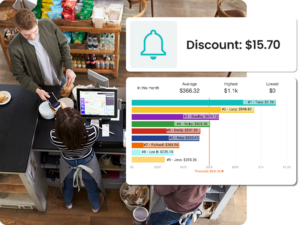
*Solink does not currently service private residential properties

Table of Contents

Table of Contents

Security cameras are crucial for monitoring and safety, but they generate significant amounts of data. This article explores the key factors affecting how much data a security camera uses per day, offering insights to optimize storage and network use.

What is security video retention?

Security video retention is how long your video system stores footage before it’s deleted or overwritten.

Retention settings matter because they affect:

  • How much footage you can review

  • Whether you stay compliant with regulations

  • How much storage you need

Some businesses only keep footage for a few days. Others need 30, 60, or even 365 days of storage, depending on risk, insurance, or legal requirements.

Solink makes retention easy. Cloud storage scales with your needs, and you control retention settings by location, camera, or event.

Need to hold on to a clip for legal or HR reasons? Flag it and store it as long as you want.

A security system setup showing a surveillance camera, a computer screen with security footage, and a wall display monitoring a person in a hoodie near a bench.

Why is video retention important?

Video retention is crucial for several reasons, impacting not just security but also compliance and operational efficiency. Retaining security footage for an adequate period ensures that evidence is available when needed to investigate incidents, resolve disputes, and comply with legal or industry-specific requirements. Below are some advantages of proper video retention:

  • It provides evidence for security investigations, helping to identify and prosecute offenders.
  • It supports compliance with legal and regulatory requirements, which may dictate minimum retention periods.
  • It aids in dispute resolution by offering clear, visual accounts of incidents.
  • It enhances security measures by allowing for the review and improvement of safety protocols.
  • It offers insights into customer behavior, which can be valuable for business analytics.
  • It helps in monitoring employee productivity and adherence to company policies.
  • It supports insurance claims by providing documented evidence of incidents.
  • It helps identify and reduce internal theft.
  • It assists in the management of access control and monitoring of restricted areas.

See how Solink elevates your security camera system.

Approaches to storing security camera data

There are several methods for storing security camera data, each with its advantages and considerations. Network-attached storage (NAS) devices offer a scalable and flexible solution, allowing users to add more storage as needed. 

Network video recorders (NVR) and digital video recorders (DVR) are popular for their simplicity and direct connection to security cameras, providing a standalone storage solution. 

Cloud video storage has become increasingly popular for its scalability, remote accessibility, and enhanced security features.

Read up on the differences between NVRs and DVRs. 

Solink presents a unique, hybrid approach to video storage, combining the benefits of local and cloud storage. It provides a hands-off, fully warrantied local storage device that ensures immediate data capture and retention, paired with the scalability and accessibility of indefinite cloud storage. 

This dual approach ensures robust data protection and easy access, allowing businesses to benefit from comprehensive security solutions without the complexities of managing extensive physical storage infrastructure.

What affects the amount of data used by security cameras per day?

The data usage of security cameras can vary widely from one system to another. Several key factors influence the amount of data generated daily by security cameras. These include the operational settings of the cameras, the quality of the footage, and the technology used for storing and transmitting the data. 

Understanding these factors is crucial for optimizing your security system’s efficiency and ensuring that your storage solutions are both adequate and cost-effective.

The primary factors that affect the amount of data used by security cameras per day are:

  • Hours per day: The total time cameras are recording each day directly impacts data usage. More hours of recording result in more data.
  • Days of retention: The length of time you store recorded footage affects the total storage required. Longer retention periods increase storage needs.
  • Number of cameras: More cameras contribute to higher data usage, as each camera adds to the total amount of footage captured and stored.
  • Frames per second (FPS): A higher frame rate means more frames are captured every second, leading to smoother video but also more data.
  • Resolution: Higher resolution cameras capture more detail, resulting in larger video files. This clarity comes at the cost of increased data usage.
  • Video quality: The quality setting of the video affects its size. Higher quality videos look better but use more data.
  • Compression type: Different compression technologies can reduce file sizes to varying extents. More effective compression reduces data usage without significantly compromising video quality.

Each of these factors plays a significant role in determining the overall data consumption of security cameras. By adjusting these variables, you can find the right balance between video quality and storage requirements to meet your security needs.

Hours per day

The amount of data required for storage increases with the number of hours a security camera records each day. Cameras that operate around the clock accumulate more footage, demanding more storage space than those set to record only during specific periods or upon detecting motion. This operational setting is crucial for balancing security needs against storage capacity.

Choosing between continuous recording and selective recording depends on the security requirements and available storage resources. Continuous recording is essential in high-security areas to ensure no event is missed, though it significantly increases storage demands. Selective recording, on the other hand, can conserve storage but may risk missing important events that occur outside the predefined recording times.

For instance, a security camera set to record 24/7 at low video quality and 960p resolution with MJPEG compression will use about 3.09 GB of storage space per day. Adjusting the recording hours can directly impact this figure, reducing the storage requirement for systems where around-the-clock monitoring is not necessary.

Days of retention

The length of time you retain recorded footage significantly impacts storage requirements. Longer retention periods mean that data accumulates over time, requiring substantial storage capacity to hold days, weeks, or even months of video. This factor is often dictated by legal, regulatory, or operational needs.

Increasing retention periods can be crucial for compliance with legal standards or for effective case management, which may require access to historical footage. However, this comes at the cost of increased storage needs. In situations where detailed long-term archives are critical, the added storage cost is often justified.

For example, retaining footage for 30 days as opposed to just 1 day multiplies the storage requirement by 30, assuming all other factors remain constant. A single camera recording at 960p and low quality using H.264 compression would need approximately 1.66 GB for a day’s footage, which scales up to about 49.8 GB for a 30-day retention period.

Number of cameras

The total data storage required grows with each additional camera added to a business video security system. More cameras generate more footage, which in turn increases the volume of data that must be stored. This factor is critical in designing a security system that can scale with the needs of a facility or operation.

Adding more cameras can enhance security coverage and reduce blind spots, making it worth the increased storage investment in many cases. Indeed, for extensive areas or locations requiring detailed monitoring from multiple angles, the benefits of additional cameras often outweigh the cost of expanded storage capacity.

With a setup of four cameras, each recording 24 hours a day at 960p resolution and low quality using H.264 compression, the total data usage would be approximately 665.28 MB per day. This example illustrates how storage requirements scale with the number of cameras in the system.

Frames per second (FPS)

FPS affects the smoothness of the video and the ability to capture fast-moving events. Higher FPS rates produce more fluid footage but also increase the amount of data generated. This setting is essential for areas where detailed motion capture is necessary.

In scenarios requiring detailed analysis of movements, such as in high-risk areas or for capturing fast-moving vehicles, a higher FPS may be justified despite the increased storage demand. Lower FPS settings can suffice in less critical areas, helping to conserve storage space without significantly compromising the effectiveness of the monitoring.

Resolution

Resolution determines the clarity and detail of the video footage, with higher resolutions providing sharper images but also requiring more data storage. High-resolution footage is crucial for identifying details such as faces or license plates, making it an important consideration for security systems.

Higher resolutions, such as 1080p or 4K, are beneficial for areas where detail is critical for identification purposes or for capturing wide scenes without losing clarity. The trade-off is the increased storage requirement, which may necessitate careful planning or the use of advanced compression techniques to manage effectively.

For example, a camera recording at a low video quality in 1080p resolution uses about 11.18 GB of storage per day, compared to 5.13 GB at 720p resolution, highlighting the impact of resolution on storage needs.

Video quality

Video quality affects the data size of recorded footage, with higher quality settings producing larger files. This is because higher quality videos contain more data to represent the visual information more accurately, resulting in clearer and more detailed footage.

High-quality settings are essential for critical areas where the utmost clarity is required, such as points of entry or areas with high-value assets. However, this necessitates larger storage capacities or more efficient compression methods to manage the increased data volume.

A shift from low to high video quality significantly increases data usage. For example, moving from low to high quality at 960p resolution and MJPEG compression can increase daily data usage from 3.09 GB to 8.96 GB for a single camera, demonstrating the storage implications of video quality adjustments.

Compression type

Compression technology is essential for reducing video file sizes while maintaining quality. Advanced types can significantly lower storage needs compared to older formats.

Choosing an efficient compression type helps store high-quality video with less data usage. Some newer methods offer major improvements in compression efficiency, leading to substantial storage space reductions for the same video quality.

Daily security camera chart

These columns should give you an idea of how all the variables interact with each other to understand how much data security cameras use per day. The last two columns are more typical arrangements.


Hours per day

Days of Retention

Number of Cameras

Frames per second (FPS)

Resolution

Video quality

Compression Type

Storage requirements

24

1

1

1

960

Low

MJPEG

3.09 GB

24

1

1

1

960

Low

H.264

166.32 MB

24

1

1

1

960

Low

H.265

34.56 MB

24

1

1

1

960

Medium

MJPEG

6.28 GB

24

1

1

1

960

Medium

H.264

200.88 MB

24

1

1

1

960

Medium

H.265

63.72 MB

24

1

1

1

960

High

MJPEG

8.96 GB

24

1

1

1

960

High

H.264

908.28 MB

24

1

1

1

960

High

H.265

103.68 MB

24

1

1

1

720p

Low

MJPEG

5.13 GB

24

1

1

1

720p

Low

H.264

200.88 MB

24

1

1

1

720p

Low

H.265

166.32 MB

24

1

1

1

1080p

Low

MJPEG

11.18 GB

24

1

1

1

1080p

Low

H.264

942.84 MB

24

1

1

1

1080p

Low

H.265

137.16 MB

24

1

1

1

3MP

Low

MJPEG

16.99 GB

24

1

1

1

3MP

Low

H.264

1.05 GB

24

1

1

1

3MP

Low

H.265

942.84 MB

24

1

1

1

5MP

Low

MJPEG

27.12 GB

24

1

1

1

5MP

Low

H.264

1.35 GB

24

1

1

1

5MP

Low

H.265

947.16 MB

24

1

1

1

8MP/4K

Low

MJPEG

44.34 GB

24

1

1

1

8MP/4K

Low

H.264

2.3 GB

24

1

1

1

8MP/4K

Low

H.265

2.12 GB

24

1

1

5

960

Low

MJPEG

222.66 GB

24

1

1

5

960

Low

H.264

12.72 GB

24

1

1

5

960

Low

H.265

8.8 GB

24

1

1

10

960

Low

MJPEG

445.56 GB

24

1

1

10

960

Low

H.264

25.74 GB

24

1

1

10

960

Low

H.265

17.15 GB

24

1

1

15

960

Low

MJPEG

668.46 GB

24

1

1

15

960

Low

H.264

38.77 GB

24

1

1

15

960

Low

H.265

25.49 GB

24

1

1

20

960

Low

MJPEG

891.37 GB

24

1

1

20

960

Low

H.264

51.79 GB

24

1

1

20

960

Low

H.265

33.84 GB

24

1

1

25

960

Low

MJPEG

1.11 TB

24

1

1

25

960

Low

H.264

64.82 GB

24

1

1

25

960

Low

H.265

42.19 GB

24

1

1

30

960

Low

MJPEG

1.34 TB

24

1

1

30

960

Low

H.264

77.84 GB

24

1

1

30

960

Low

H.265

50.54 GB

24

10

1

1

960

Low

MJPEG

30.91 GB

24

10

1

1

960

Low

H.264

1.66 GB

24

10

1

1

960

Low

H.265

345.6 MB

24

30

1

1

960

Low

MJPEG

92.73 GB

24

30

1

1

960

Low

H.264

4.99 GB

24

30

1

1

960

Low

H.265

1.04 GB

24

1

4

1

960

Low

MJPEG

12.36 GB

24

1

4

1

960

Low

H.264

665.28 MB

24

1

4

1

960

Low

H.265

138.24 MB

24

1

16

1

960

Low

MJPEG

49.46 GB

24

1

16

1

960

Low

H.264

2.66 GB

24

1

16

1

960

Low

H.265

552.96 MB

12

1

1

1

960

Low

MJPEG

1.55 GB

12

1

1

1

960

Low

H.264

83.16 MB

12

1

1

1

960

Low

H.265

17.28 MB

24

30

4

24

1080p

High

MJPEG

98.42 TB

24

30

8

12

5MP

High

MJPEG

239.15 TB

Solink provides cloud video security tailored to your storage needs

Solink offers flexible cloud video security solutions that adapt to the specific storage needs and budget constraints of any company. By allowing customizable retention settings, Solink ensures that businesses can find the perfect balance between their security requirements and available resources. 

Whether you need to store high-resolution video for extended periods or are looking for cost-effective ways to manage data, Solink’s scalable services provide the ideal solution. With Solink, companies can leverage advanced security technology without compromising on efficiency or effectiveness, ensuring that their security system is as dynamic and adaptable as their operations.

Looking to find new ROI in your video security footage? See how Solink can give you new business insights.

Table of Contents

Table of Contents

For banks, security is as much about protecting physical spaces as it is about guarding against digital threats. Branches, ATMs, cash-handling areas, and secure rooms are all targets for theft, fraud, and other criminal activity.

Without strong physical security, a single incident can lead to financial loss, operational disruption, and damaged customer trust.

See how Solink can help secure your financial services business.

10 threats to the banking industry

A person holds a smartphone displaying ATM security footage, while a laptop shows similar video. A form on the side shows options to save, title, and email the video clip.

1. Branch robberies during operating hours

Armed robberies remain one of the most direct threats to staff and customers. They often occur during busy periods when more cash is on hand and staff are distracted. Criminals study branch layouts, staffing patterns, and routines to minimize their time on site while maximizing the haul. Even if no one is injured, the psychological impact on employees can be lasting, and public perception of safety can be damaged.

2. ATM physical attacks and tampering

ATMs are valuable targets because they combine cash access with limited human oversight. Physical attacks can involve brute force removal, explosive entry, or drilling into the cash compartment. Tampering methods include card skimmers, shimmers, and hidden cameras to capture PINs. Some attackers use “cash trapping” devices or manipulate the machine’s dispensing system to trigger multiple payouts. These attacks can occur outside regular business hours when response times are slower.

3. Cash-handling theft inside branches

The process of moving cash between tellers, vaults, and armored transport creates multiple opportunities for theft. Internal actors can manipulate transactions, skim small amounts over time, or falsify reconciliation reports. External theft can happen during cash deliveries or collections if access points are not tightly controlled. These incidents often go unnoticed for long periods if oversight relies solely on manual reconciliation.

4. After-hours break-ins

Closed branches can be attractive targets, especially in low-traffic or poorly lit areas. Criminals may target vaults, offices with sensitive information, or cash-handling equipment left on site. Entry methods range from forced doors and windows to rooftop access or bypassing alarm systems. Extended closures, such as holidays, can increase the likelihood of successful break-ins.

5. Suspicious customer behavior and pre-attack scouting

Not all threats are immediate. Criminals often conduct reconnaissance to understand a branch’s security posture. This can include loitering in lobbies, timing staff movements, testing how close they can get to restricted areas, or asking seemingly innocent questions about operations. Without staff awareness and proactive monitoring, this behavior can be dismissed as harmless until it’s too late.

6. Insider threats

Employees and contractors with legitimate access to restricted areas can abuse their position to steal cash, records, or customer data. Insider threats are not always malicious from the start; financial stress, opportunity, or coercion can change behavior over time. Because these individuals often know where security gaps exist, their actions can be difficult to detect without layered oversight.

7. Third-party and vendor exposure

Service providers—such as ATM maintenance crews, cleaning teams, or construction contractors—often need temporary access to secure areas. This opens a window for theft, unauthorized activity, or accidental compromise of security systems. Risks increase when identity checks are inconsistent or escort policies are not followed. Some attackers pose as legitimate workers to gain access.

8. Social engineering at the branch level

Criminals may impersonate inspectors, repair personnel, or corporate staff to bypass front-line defenses. In-person social engineering works because it leverages trust, urgency, and authority—especially if staff are not trained to challenge individuals in uniforms or with convincing credentials. Once inside, attackers can access cash storage, sensitive documents, or IT systems.

9. Security blind spots

Even branches with comprehensive camera systems can have areas that are poorly covered or not monitored in real time. Common blind spots include vestibules, parking lots, drive-up lanes, and areas behind counters. These gaps allow criminals to prepare or execute attacks without detection. Blind spots also make it harder to piece together a complete picture during investigations.

10. Coordinated attacks across multiple locations

Organized groups often target several branches or ATMs in a short time frame, making it difficult for individual sites to connect the dots. Without centralized monitoring, patterns of similar behavior, clothing, or vehicle use can go unnoticed. These attacks may be part of larger regional or national crime rings, and early detection often depends on recognizing trends across locations.

How Solink can help

The threats facing banks today demand more than isolated security tools—they require connected intelligence. Solink unifies your video monitoring with teller, ATM, and alarm data so every incident is captured in context. This means you can see not just what happened, but when, where, and alongside which transactions.

With Solink, you can:

  • Monitor every location from one dashboard – ATMs, lobbies, teller stations, vaults, and parking lots.

  • Investigate in minutes instead of hours – search by transaction, door access, or activity and instantly find matching video.

  • Prevent repeat losses – spot suspicious patterns across multiple branches before they escalate.

  • Cut false alarms – use video verification to confirm real threats and avoid unnecessary dispatches.

  • Stay compliant and secure – benefit from SOC 2 Type 2 protocols, customizable permissions, and complete audit trails.

  • Keep systems healthy – receive automatic alerts when a camera is offline or obstructed.

By aligning physical security with operational data, Solink gives your team the visibility to act faster, reduce risk, and protect both assets and people—without adding complexity to your workflow.

Using AI and video alarms for your bank

Banks need security systems that respond instantly to real threats—without wasting resources on false alarms. Solink’s Video Alarms turn your existing cameras into a smarter, faster, more reliable defense.

Fewer false alarms, faster response
By combining AI monitoring with video verification, Solink filters out nuisance triggers like animals, weather, or debris. Only probable threats are flagged for review. This means fewer false dispatches, lower fines, and an average verified police response in under nine minutes.

Smarter detection with AI
Solink’s AI doesn’t just detect motion—it understands context. It can distinguish between suspicious human activity and harmless movement, and it learns over time to refine its accuracy. The result is a security system that scales across all your branches without overwhelming your team with noise.

Cloud-based and hardware-light
There’s no need to rip and replace your existing camera system. Solink turns what you already have into a fully integrated alarm and monitoring network, managed from the cloud. This gives you a unified view of every ATM, lobby, vault, and branch from anywhere.

Verification that builds trust
When an alert is triggered, AI flags the event but humans make the final call. This blend of automation and oversight builds trust with law enforcement, so verified threats get priority response.

Deterrence before damage
Video Alarms can trigger visible deterrents—like strobes or live talkdown—before a threat moves from the outside in. This stops many incidents before they escalate.

Operational efficiency at scale
For security operations centers or teams managing multiple branches, Solink’s VerifEye console enables rapid review of hundreds of alarms with less effort. Your cameras effectively become a virtual guard network, monitoring every perimeter and key area simultaneously.

With AI-driven filtering and integrated video alarms, your bank’s security shifts from reactive to proactive—stopping threats earlier, responding faster, and protecting people, property, and assets more effectively.

Table of Contents

Table of Contents

In the growing cannabis industry, comprehensive dispensary security solutions are more crucial than ever. This is especially true within the video security being used inside of dispensaries. Ensuring the safety of your products, employees, and customers requires industry-leading innovations. From advanced video monitoring to integrated systems that work together with your video security, the right security measures can make a significant difference. This article will explore 10 industry-leading dispensary security solutions within the video security system realm, helping to protect businesses and ensure compliance with local and federal regulations.

Discover how Solink’s technology can provide the robust security your cannabis business needs.

A person holds a jar with herbs in front of a tablet displaying product images. Text reads "Dispensary guide: Mitigating theft and boosting sales.

You're leaving money on the table if you skip this.

“Dispensary Guide: Mitigating Theft and Boosting Sales” reveals how to protect profits, prevent losses, and stay ahead of the competition. Download now—before your competitors do.

Industry leading video security solutions and trends for dispensaries

1) Point of sale (POS) integration with video to see every transaction and event

Integrating point-of-sale (POS) systems with video security is a game-changer for enhancing security and operational efficiency. By linking transactional data with corresponding video footage, businesses can gain a comprehensive view of every sales event. This integration helps detect and prevent fraud, ensures accurate record-keeping, and improves overall business operations.

Solink’s POS integration with video security offers cannabis businesses a powerful tool to monitor and analyze every transaction. This seamless integration provides valuable insights and enhances the ability to manage and secure retail operations effectively.

Some key features of POS integration with video include:

Transaction Verification: Link each POS transaction with video footage, allowing for easy verification of sales events. This ensures that every transaction is accurately recorded and can be reviewed if discrepancies arise.

Fraud Detection: Identify and investigate suspicious transactions, such as voids, refunds, or discounts. By reviewing video footage associated with these events, businesses can detect and address potential employee theft or customer fraud.

Dispute Resolution: Quickly resolve customer disputes by reviewing the video footage of the transaction in question. This provides clear evidence to support the resolution process and enhances customer satisfaction.

Inventory Management: Monitor high-value or sensitive transactions, ensuring that inventory movements are accurately tracked and recorded. This helps prevent shrinkage and ensures inventory integrity.

Employee Accountability: Track employee behavior and performance at the point of sale. By reviewing video footage, management can ensure that employees follow proper procedures and provide excellent customer service.

Training and Compliance: Use video footage to train employees on proper POS procedures and ensure compliance with industry regulations. This helps maintain high standards of operation and reduces the risk of errors.

A bar chart displays total discount amounts by employees, with labels and a $600 threshold line. A phone screen shows an alert about discounts exceeding $600 by four employees.

2) Remote monitoring from any device

Maintaining robust security across all operations is paramount. Real-time remote monitoring from any device plays a crucial role in achieving this. By enabling business owners and security personnel to access live video feeds and recorded footage from smartphones, tablets, or computers, it ensures continuous oversight and immediate response to any incidents, no matter where they are.

This can include multiple stores across one individual platform with a company like Solink. Offering seamless access to video security, Solink allows users to monitor multiple locations from a single platform. This not only enhances situational awareness but also ensures that security measures can be managed and adjusted on-the-fly, promoting a proactive approach to threat detection and resolution. In an industry where security breaches can have significant financial and regulatory repercussions, having the ability to oversee operations remotely and in real time is indispensable.

3) Video analytics that help your dispensary thrive

Security extends beyond merely recording events; it’s about understanding patterns and predicting potential issues before they arise. Video analytics play a crucial role in this proactive approach to security. By analyzing video footage in real-time, these advanced systems can identify unusual activities, such as loitering, unauthorized access, or suspicious behavior, and send instant alerts to security personnel or owners.

Solink’s video analytics act as a powerful tool for cannabis businesses aiming to enhance their security measures and operational efficiency. These analytics provide actionable insights that help in making informed decisions, whether it’s optimizing store layouts, managing staff more effectively, or ensuring compliance with regulatory requirements. By leveraging data-driven insights, cannabis companies can not only improve their security posture but also drive business growth, ultimately helping the company thrive in a competitive market.

4) Using cloud storage correctly

Maintaining secure and accessible video footage is super important. Cloud storage provides an innovative solution to ensure data safety, regulatory compliance, and operational efficiency. By storing video footage in the cloud, cannabis businesses can protect against data loss due to hardware failures and streamline access for security reviews and audits.

A security company’s cloud storage solutions should offer numerous advantages tailored to the needs of the cannabis industry. With secure, scalable storage, businesses should be able to easily manage vast amounts of video data without the need for extensive on-site hardware. This not only reduces costs but also enhances data security by minimizing the risk of tampering or theft.

Some key features of cloud storage include:

  • Secure Data Storage: Cloud storage ensures video footage is stored securely off-site, protecting it from physical damage, theft, or tampering that can occur with on-premise systems.
  • Scalability: As your business grows, so does your need for storage. Cloud solutions provide scalable storage options that can expand with your data requirements without the need for additional hardware investments.
  • Easy Access: Authorized personnel can access stored video footage from anywhere, at any time, using any device. This flexibility is essential for timely reviews, audits, and incident investigations.

By leveraging these cloud storage features, cannabis businesses can ensure the safety and integrity of their video data, maintain compliance with industry regulations, and improve overall operational efficiency. This robust approach to data management provides peace of mind and supports the long-term success of the business.

5) Being custom alerted by what you want

Secure and efficient operation requires the ability to react quickly to specific events. Custom alerts enable businesses to receive notifications tailored to their unique security needs, ensuring that critical incidents are addressed promptly. By setting personalized parameters, cannabis businesses can focus on the most relevant activities and enhance their overall security posture.

Solink’s custom alerts, for example, are amazing for proactive security management. These alerts can be configured to monitor various aspects of your operations, ensuring that you are notified immediately when specific conditions are met.

Some key features of custom alerts include:

Motion-Based Alerts: Receive notifications when motion is detected in restricted areas, such as storage rooms, vaults, or outside of business hours, helping to prevent unauthorized access and potential theft.

Access Control Alerts: Get alerts when unauthorized access attempts occur, such as when someone tries to enter a restricted area without proper credentials, ensuring prompt response to potential security breaches.

POS Transaction Alerts: Monitor point-of-sale transactions for unusual activities, such as high-value sales, voids, or refunds, allowing for immediate investigation of potential fraud or employee theft.

Under the Solink umbrella, every one of these alerts is paired with the video footage as well. That’s what makes a company like Solink able to be more aware of the workings within your store and allows you not to miss a beat when searching for something.

6) Motion detection

In the cannabis industry, detecting and responding to unauthorized movements is crucial for maintaining a secure environment. Motion detection technology provides an effective solution by monitoring specified areas and triggering alerts or recordings when movement is detected. This proactive approach helps prevent theft, unauthorized access, and other security breaches.

Solink’s motion detection features are designed to offer cannabis businesses a robust security solution. By setting up motion detection zones, businesses can ensure that critical areas are constantly monitored and any suspicious activity is promptly addressed.

Some key features of motion detection include:

Zone Configuration: Define specific areas within your facility where motion detection is critical, such as storage rooms, vaults, and entry points. This ensures focused monitoring of high-risk areas.

Remote Management: Manage motion detection settings and review alerts from any device, ensuring that you can maintain security oversight even when off-site.

7) Motion search for specific events

Motion search is a powerful tool in modern video management systems. It enables users to quickly locate specific events in their video footage by identifying and highlighting moments of movement. This feature eliminates the need to manually sift through hours of video, saving significant time and effort.

Here’s how motion search works:

  1. Automated Detection: The system automatically detects motion and marks these events for easy access.
  2. Customizable Parameters: Users can define specific parameters, such as time frames or particular areas within the camera view, to refine their searches.
  3. Efficient Review: By focusing on the moments where motion is detected, users can swiftly pinpoint incidents and reduce the time spent on video review.
  4. Enhanced Security: Quickly finding and reviewing motion events helps businesses address security concerns more effectively, ensuring no critical incidents are missed.

Solink offers advanced motion search as part of their cloud video management system, enhancing efficiency and security for businesses.

8) Easily saving and sending events to authorities

Imagine a world where no mailing or hand-to-hand physical transaction of video footage needs to take place. Where no downloading and large files need to change hands. Smart search capabilities and user-friendly save and send functions streamline the process of finding, storing, and sharing important video clips. These types of innovative features within security camera systems enable businesses to quickly locate relevant footage, save it securely, and distribute it to necessary parties, enhancing overall security and efficiency. It’s this world that is taking security to a better and whole new level for the cannabis owners of business.

Solink, as the example, uses smart search, save, and send functions to provide a powerful toolset for cannabis businesses. These features are designed to make video management intuitive and effective, ensuring that critical incidents can be addressed promptly.

Some key features include:

Smart Search: Utilize advanced algorithms to quickly locate specific events or incidents within vast amounts of video footage from a dashboard. Search by motion, time, specific objects, or activities to find exactly what you need without sifting through hours of video.

Save Functions: Securely save important video clips for future reference. Saved footage can be stored in the cloud, ensuring it is protected from local hardware failures and easily accessible for audits, investigations, or compliance purposes.

Send Functions: Effortlessly share video clips with relevant personnel or external parties. Solink’s system allows users to send video links via email or other communication methods, providing a secure and efficient way to distribute critical footage.

9) Blocked entrance and exit detection

Ensuring that all entrances and exits remain unobstructed is crucial for both security and safety. Blocked entrance and exit detection technology helps monitor and maintain clear access points, ensuring compliance with safety regulations and preventing unauthorized access or potential security breaches. This feature is vital for emergency preparedness, efficient operations, and maintaining a secure environment.

Solink’s blocked entrance and exit detection offers cannabis businesses a proactive solution to monitor access points continuously. By detecting and alerting when an entrance or exit is blocked, businesses can respond swiftly to potential issues, ensuring that all access points remain clear and functional.

Solink Blocked Exit detection uses advanced AI to keep your employees safe and prevent expensive OSHA fines.

Solink leads the way for dispensary security solutions…

From real-time remote monitoring and video analytics to POS integration and blocked entrance detection, these technologies provide comprehensive security, enhance operational efficiency, and ensure compliance with industry regulations. By leveraging features such as motion detection, audit trails, heat mapping, and customizable alerts, cannabis businesses can proactively manage security threats, streamline processes, and optimize their operations.

These innovations not only protect valuable assets but also create a safer environment for employees and customers, fostering trust and reliability in your business operations. The benefits of integrating these advanced security features are clear: improved loss prevention, enhanced employee accountability, better compliance, and overall operational excellence.

For cannabis businesses looking to elevate their security and operational efficiency, Solink offers tailored solutions that meet the unique challenges of the industry. Contact Solink today to learn how our advanced security technologies can support your business’s growth and success.

Book a demo with Solink to see the real power you can have over your security in your dispensary today.

Protect your business today with Solink

Solink’s video analytics and monitoring solutions help create a safe, secure, and healthy environment for businesses.

Schedule a product demo with our experts
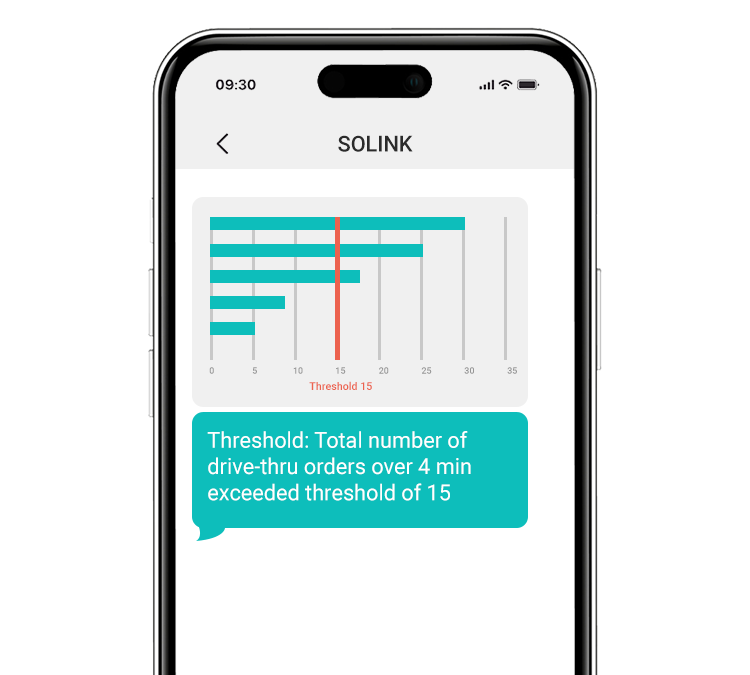
*Solink does not currently service private residential properties

Table of Contents

Table of Contents

Choosing the best security cameras for retail stores is crucial for safeguarding your business, merchandise, and customers. This guide explores top camera options tailored for retail environments, highlighting features that enhance security, provide valuable insights, and ensure comprehensive coverage.

See how Solink elevates your security camera system.

A security camera, a laptop displaying security footage from multiple areas, and a smartphone showing a video feed are shown together.

Benefits of security cameras for retail stores

Security cameras in a retail setting offer many advantages that extend beyond traditional security measures. While their primary function is to enhance security, modern security systems, particularly when integrated with Solink, also contribute significantly to operational efficiency, sales and marketing optimization, and improved customer service. This comprehensive approach not only safeguards the business but also drives its growth and development in various aspects.

The integration of security cameras into retail store operations has revolutionized how businesses approach both security and non-security challenges. From deterring theft to optimizing store layouts, the benefits are multifaceted. 

Here is a list of some of the key advantages:

  • Reduced internal theft: Security cameras act as a deterrent against employee theft, helping retailers protect assets and maintain integrity within the workforce.
  • External theft prevention: Visible security cameras discourage potential shoplifters and burglars, significantly lowering the risk of external theft in retail stores.
  • Reduced injury liability: Security cameras can document incidents, providing evidence that can be crucial in defending against false injury claims and reducing liability.
  • Lower discount abuse: Monitoring transactions and customer interactions helps in preventing abuse of discounts or return policies in retail stores.
  • Reduced operational shrink: Security cameras can help identify inefficiencies and sources of shrinkage within operations, allowing for corrective measures.
  • OSHA fines prevention through blocked exit detection: Security cameras ensure compliance with safety regulations by monitoring exit blockages, thereby preventing potential OSHA fines in your retail stores.
  • Heat maps for better store design: Analytics from security camera data can create heat maps, aiding in store layout optimization for improved customer flow and experience.
  • Merchandising effectiveness: Retail store security camera data can inform better merchandising decisions based on customer behaviors and preferences.
  • Better speed of service: Monitoring customer service areas helps in optimizing staff allocation and service processes for quicker customer handling.
  • Increased adherence to upsell scripts: Video monitoring ensures that staff are following prescribed sales techniques and upsell opportunities in your retail stores.
  • Conflict resolution: Video footage provides unbiased evidence in customer or employee disputes, aiding in quick and fair resolution.
  • Employee training and compliance: Reviewing retail security camera footage can aid in employee training programs and ensure adherence to company policies.
  • Monitoring high-value items: Specialized security of high-value areas prevents theft and misuse of expensive products or equipment.
  • Customer safety: Security cameras in stores enhance customer safety, contributing to a secure and comfortable shopping environment.

Let’s look at some of the best retail store security camera options available today.

Best dome security cameras for business

Dome cameras are a go-to for retail store security systems, valued for their discreet appearance and broad coverage. The dome shape is hard for people to see which way the camera is pointing, which boosts security by being less obvious. They work well inside and outside, providing clear images no matter the lighting.

Retailers might consider models like the Hanwha XND-6085V and AXIS Q35 Series, known for high-quality images and versatility in different lights. Their easy installation and durable designs make them perfect for stores looking for low-profile yet effective video security.

1. Hanwha XND-6085V

This camera stands out for delivering clear footage, crucial for spotting incidents or analyzing customer behavior in retail spaces. It’s tough enough for any part of the store, easy to set up, and connects well with other security tech, making it a solid option for comprehensive store security.

2. AXIS Q35 Dome Camera Series

Known for capturing detailed video even in tricky light, these cameras are great for areas that need careful watching. They’re tough, work inside or outside, and fit smoothly into current security setups, ensuring that retailers have reliable eyes on their spaces.

3. UniFi Dome Security Cameras

With a sleek design, these cameras offer high-resolution footage and wide views, ideal for covering entire store areas. Their user-friendly setup and integration with the UniFi network make them a favorite among retailers for efficient and effective video security.

Best turret security cameras for business

Turret cameras, with their flexibility and discreet design, are excellent for retail settings. They let you change the viewing angle without moving the whole camera, ideal for areas that need regular adjustment or have varied video security needs.

Turret cameras combine the discreet nature of dome cameras with the directional flexibility of bullet cameras, making them a versatile choice for various types of security cameras for business.

1. Ubiquiti Camera G3 Flex

This camera is adaptable, offering high-definition video day and night, and works both indoors and outdoors. Its design is weather-resistant, blending well with store aesthetics while ensuring continuous, clear monitoring.

2. Hanwha XNV-L6080

This model is praised for its clarity and adaptability, featuring a motorized lens for easy focus changes. It’s designed to capture high-quality footage in all retail environments, from the sales floor to the parking lot, making it a versatile pick for dynamic video security needs.

Best bullet security cameras for business

Bullet cameras are easily noticed, which can deter potential theft, and are suited for watching specific spots like store entrances or checkout areas. Their long shape allows for precise aim and zoom, providing detailed footage where it matters most.

1. AXIS Bullet Camera Series

Designed for outdoor use, these cameras are robust and capture high-quality video over large areas. Features like zoom and autofocus help retailers monitor spaces effectively, making them a top choice for perimeter security.

2. Ubiquiti Camera G4 Bullet

With up to 4K resolution, this camera offers clear images over a wide area, perfect for identifying activities around the store or in the parking lot. Its night vision capabilities and weatherproof design make it a reliable option for all conditions.

3. Hanwha Q Series Bullet Cameras

These cameras deliver sharp, efficient video, ideal for monitoring retail environments. They come with features that enhance video quality and reduce bandwidth needs, supporting retail security with advanced technology.

Best PTZ security cameras for business

PTZ (pan-tilt-zoom) cameras offer comprehensive coverage for retail stores, able to pan, tilt, and zoom to monitor large areas effectively. They’re especially useful for tracking movement or adjusting focus in real-time, essential for large retail spaces..

1. Hanwha HCP-6320A

This camera provides Full HD video, allowing detailed observation across store areas. Its PTZ capabilities ensure that all parts of the store are covered, making it a robust choice for both indoor and outdoor monitoring.

2. UniFi Protect G4 PTZ

Offering 4K resolution and a 22x optical zoom, this camera captures detailed footage across large retail spaces. Its tracking features and night vision capability make it a powerful tool for 24/7 surveillance.

3. AXIS P56 PTZ Camera Series

These cameras are built for extensive area coverage, offering high-definition video and powerful zoom. Their adaptability makes them suitable for a variety of retail security needs, ensuring safety and security.

Best 360 security cameras for business

360 cameras provide panoramic views, perfect for monitoring wide areas in retail settings with a single device. They capture every angle, ensuring there are no blind spots in monitoring, crucial for open retail spaces.

Their integration into a cloud-based security camera system allows for enhanced data analysis and coverage, maximizing the effectiveness and reach of a business security camera system.

1. AXIS Multidirectional Cameras

These cameras cover vast areas with adjustable angles, ideal for keeping an eye on multiple store sections at once. Their flexibility and quality make them indispensable for comprehensive retail security.

2. Hanwha 360 Camera Series

Offering a full view with high-resolution imaging, these cameras are perfect for monitoring all store activity. Their wide coverage and digital zoom capabilities mean detailed video monitoring with fewer cameras.

3. Ubiquiti Camera AI 360

With advanced AI and a 360-degree view, this camera enhances retail security by detecting and analyzing movement throughout the entire store. Its high-resolution imaging and network integration make it a top choice for modern retail security solutions.

Solink gets more out of your retail security camera system

Solink enhances your retail security camera system by integrating advanced analytics and management tools, making it easier to get more from your monitoring setup. By focusing on key aspects like loss prevention, customer safety, and operational insights, Solink ensures your retail store is not only protected but also optimized for success.

Want to turn your retail security cameras from a cost driver to profit center? See how we can help.